
 Add as a preferred source
Steam, which provides digital distribution of games, offers players various features. With the updates made for the platform, different features are added that will make the work of the players easier. One of these features Steam Family SharingIt is very curious by the players. Let's take a look at what the family sharing feature is and how to use it.
What is Steam Family Sharing?
Steam Family Sharingallows users to share their games and applications with players with different Steam accounts. Thus, the players share with their friends after they finish the one-man and story games they play, allowing them to access the game.
With the rapid increase in game prices in our country, the family sharing feature helps many game lovers. How about family sharing?
How to share Steam Family?
- Run the Steam app as an administrator, and in the upper left "SteamClick on the " menu.
- In the window that opens"SettingsClick ".
- left side of the Steam settings windowFamilyClick ".
- "Authorize this computer for library sharing"Enable" option.
- In the Family View section, make the necessary settings for the games you want to share.
- When a problem is encountered, enter a recovery email to access your account.
- Set a password so that the family account can be accessed.
- Authorize the accounts you want to allow from the Family Library Sharing section. If no account is visible, you can log in to your friend's account from your computer and try it.
- Finally in two accounts"FamilyOpen the " menu and select each other to activate the sharing.
The above steps are the curious ones by the players.How to share Steam Family?" It is an answer for the question. When these steps are applied in order, the games in your Steam library will be shared without errors.
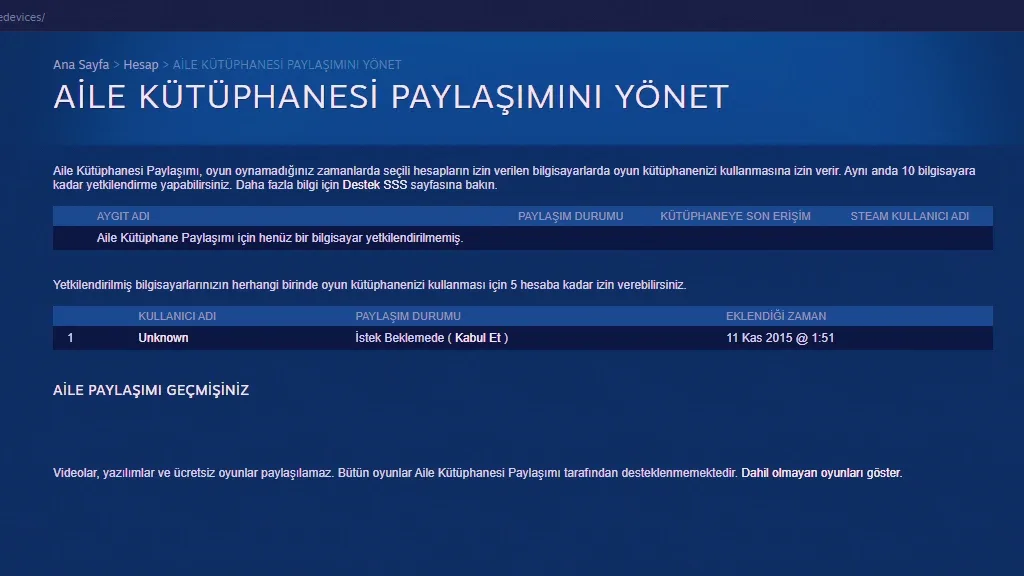
How to turn off Steam Family Sharing?
- Login to the Steam account where you share your family.
- From the upper right corner to your profile and then "Account DetailsClick ".
- On the page that opensFamily settingsin the "" section "Manage family library sharingClick the " button.
- In this page, you will see a list of authorized accounts for Steam Family Sharing.
- Next to the account you want to terminate the family sharing "(withdraw)Click ".
When you complete all the transactions, the family sharing will be terminated with the account you removed the access from. To close access in all sessions and reset all settingsReset settings for family library sharingYou can click ". After doing this, if you want to open the family share, you need to set all the settings and permissions from the very beginning.
You May Also Like: How to Remove the Foreign Player Limit in FM 2023 Turkish League
Frequently Asked Questions About Steam Family Sharing
Thanks to the family sharing feature offered by the Steam platform, players can access different games without exceeding their budget, thanks to their friends. You can find the answers to the most curious questions about this feature by the players below.
How many people do Steam Family Sharing make?
Family sharing can be done with a maximum of 5 family members in order to be used in accordance with its purpose.
Which Steam Games are available for family sharing?
Most of the games published on the Steam platform can be played on different accounts with family sharing. However, since some games are not compatible with this feature, the game experience can be negatively affected. Therefore, before you can share the games with your friends, you can check whether it is suitable for family sharing.
Can Steam Family Shared Accounts Play the Same Game?
No, family sharing accounts unfortunately cannot enter the same games. When the family sharer enters a game, other accounts are automatically removed from that game.
Result
In this article, after the hikes for games, the most curious ones by the players. Steam Family Sharing Feature We have given detailed information about it. If you encounter any errors while sharing a family, please specify in the comments section. Also for more game guides Oyunkonsei.com/game-guides/ You can click on the link!