
 Add as a preferred source
Valorant is currently among the most popular FPS games. Liked by millions of players since the first day of debut valorantA perfect choice for those looking for competitive FPS game. However, some players may encounter some problems that will negatively affect competitive games. No sound from microphone one of them. Valorant microphone problem Living players can overcome this with a few simple methods.
How to solve the Valorant microphone problem?
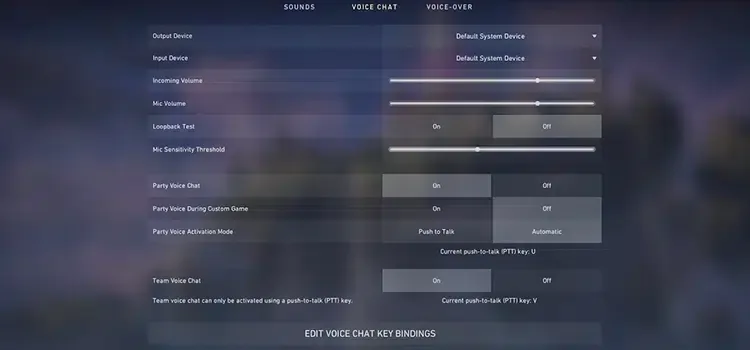
Voice communication can change the fate of the game, as those who play Valorant and many competitive FPS games know very well. Giving the right info to the players in the team can be said to be half of winning. It is always advantageous to know the information such as the location of the opposing players and the equipment they receive in that hand. But Voice not going through the VALORANT microphone Frustrating things like this prevent the delivery of this information. You can solve this problem by following the steps below.
- If you have a headset, make sure that the headset you are using is properly connected to the computer. Check that the inputs are fully seated. If the entries are not fully seated, the players in the team may not be able to hear your voice or hear them sizzling.
- Check if the microphone you are using is selected by default. Windows search sectionSound settingsType " and click on the first option. Here, select your microphone from the Input Device section.
- Check that your privacy settings are made correctly. To the search section again"PrivacyYou can access the screen where you can change the privacy settings by typing ". Allow the microphone to be used for all applications on the screen that opens.
- Select the microphone you use in the communication section of the game and restart the game. Some players can only solve this problem by closing and opening the game. It is a very simple method, but it can be incredibly effective.
- You have tried the above and if the problem still persists, the wires in the cables of the equipment you are using may be damaged. In this case, you can send your equipment to the technical service.
Valorant microphone problem solution You can follow the steps above in order. Despite everything, if the problem is not solved Valorant Official Site You can log in to your account and create a ticket. In this way, you can find different solutions that can solve your problem. Like this Game Guides If you want more to come, you can specify it in the comments of the subject.
You May Also Like: How to Fix the Black Screen in UNO