
 Add as a preferred source
Millions of players enjoyed UNOIt can also be played online from the computer. Those who want to play online can buy the game on Steam for 119.00 TL. After buying the game uno black screen problem you may encounter. If you have encountered such a problem, you can apply the solution in our content.
How to Solve Uno Black Screen Problem?
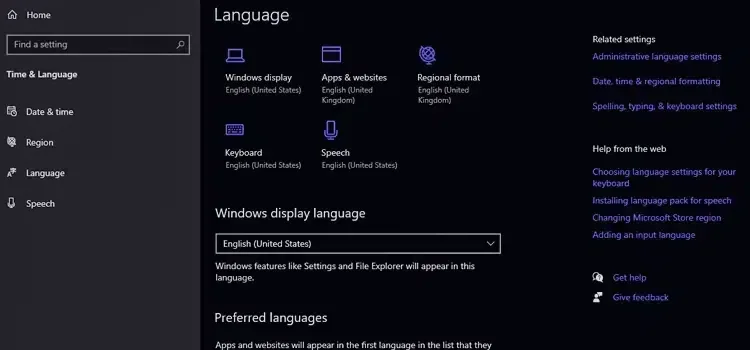
Many of the players who bought Uno cannot play the game because of the black screen problem. Those who have played since the first time the game was released state that such a problem has arisen after the last update. If you too UNO Black splash screen If you cannot go beyond, the problem will be solved when you follow the steps below.
- First, turn off Steam completely.
- Type language settings in the Windows search section and click on the first result.
- In the window that opens, click the Add Language button, select English and press the Next button. Then when you press the Install button, the installation will start.
- After the installation is complete, select USA from the Country or Region section at the bottom.
- Finally, change the Windows viewing language to English and restart the computer.
- When you start the game as an administrator, everything will work fine.
It has been very common in recent times uno black screen problem These are what you can do for. If you have done everything in order, the game will open. If there is a place that you cannot do, be sure to specify it in the comments section. After the game is fixed Uno Card Meanings You can learn from our content what the cards in the game do.
You May Also Like: How to Fix Black Screen in FM 22