
 Add as a preferred source
Although PUBG has been in development for a long time with regular updates, some players still continue to get errors. The problem of returning to the lobby after the game is one of them. In this article, pubg post game post lobby loading problem We will be here with solution methods.
Why isn't the lobby loaded after pubg game?
Returning to the lobby after each game in PUBG has become a torture for most players. Although the game is updated regularly, this problem is unfortunately not yet resolved. What about the post-game lobby, why is it not loading? What's the problem?
There may be various situations in PUBG that cause the lobby not to load. The most well-known of these is the instability of the internet connection. However, the deterioration in the game files may also cause the lobby not to be loaded after the game. So how is this problem solved?
Pubg post-game lobby loading problem solution
Players who are bored of restarting the game because the lobby is not loaded after every game in PUBG can solve the problem with the following solution methods. These methods can also be used as a different access route to PUBG lobby.
Reconfirm game files
Since PUBG receives regular updates, some files change with each update. In this process, the corruption of some files may cause the post-game lobby to be loaded late. The solution is quite simple.
- First open the Steam library.
- PUBG: Right-click Battlegrounds game and "SpecificationsEnter the " tab.
- In the Properties window"Installed filesClick on the " menu.
- Finally "Verify game file integrityStart the verification process by clicking the " button.
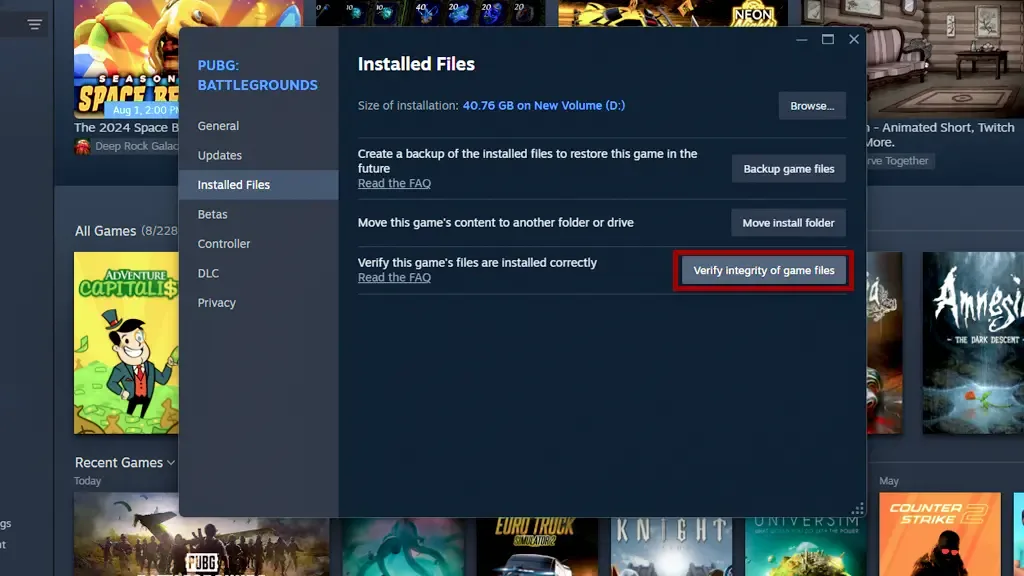
Wait until Steam completes file verification. When the process is complete, log in to the game again.
change dns
pubg post game post lobby loading problem, may occur when there is no stable Internet connection or when there is a problem with DNS. The best thing you can do in this situation is to switch to a new DNS address.

Although there are many DNS addresses on the internet, not all of them give the desired performance. But Cloudflare Warp offers a much faster and secure connection than any other DNS. Cloudflare Warp can be downloaded by entering one of the 1.1.1.1 or One.one.one.one links from the internet browser.
You May Also Like: How to Fix Valorant Updating Repeatedly
After installing the program, only DNS can be activated or DNS and VPN can be turned on at the same time. DNS and Warp should be opened at the same time to solve the problem of not loading the lobby. We would like to point out that there will be no delay in the game during connection to the VPN.
Using SSD
Today, although many players have SSDs on their computers, those who do not have enough storage use HDD (harddisk) as an extra. They even install many games on the harddisk. However, the games on the hard disk are loaded very slowly.
Those who want to return to the lobby quickly after the game in PUBG should definitely install the game on the SSD. Thus, the game will be loaded in seconds and the problem of waiting too long to return to the lobby will be eliminated.
Result
In this article pubg post game post lobby loading problem We have included various solution methods for You can eliminate the problem of returning to the lobby by applying the solution methods one by one. Also for PUBG graphics settings that allow you to play the game more fluently https://oyuncukonseyi.com/pubg-grafik-ayarlari/ You can click the link.