
 Add as a preferred source
Developed by Game Science, Black Myth Wukong has attracted great attention around the world with its unique war dynamics and graphics quality. However, some players faced a number of problems in running the game properly. In this article we will share Black Myth Wukong Won't Open Problem Solution Methodswill make the game open without any problems. Without further ado, let's move on to these methods!
Why doesn't Black Myth Wukong open?
Black Myth Wukong entered the game world on August 19, 2024. As soon as he entered, he was highly appreciated by both publishers and players. There are players who cannot run the game properly as well as the players who experience the game.
If Black Myth Wukong does not open normally, there may be more than one reason. Corruptions in game files, outdated drivers, not updating the Windows operating system or situations caused by the game itself are among the main reasons. Here Black Myth Wukong Won't Open Problem Solution Methods!
Black Myth Wukong Won't Open Problem What are the Solution Methods?
- update windows
- Verify game files
- Installing the latest versions of drivers
- Changing Windows Language to English
Players who encounter Black Myth Wukong won't open can eliminate the problem by using the above solution methods. Let's take a closer look at these methods.
update windows
Black Myth Wukong game is a new game, so it may not work properly in older versions of Windows. Those who want to enter the game without any problems can upgrade the Windows operating system to the latest version.
Updating Windows to the newest version ensures that various errors are resolved and important vulnerabilities are closed. These updates also solve problems of accessing new games that are released.
Verify game files
file verification, most frequently applied Black Myth Wukong Won't Open Problem Solution Methods is between. Files that can be corrupted for any reason prevent the game from opening.
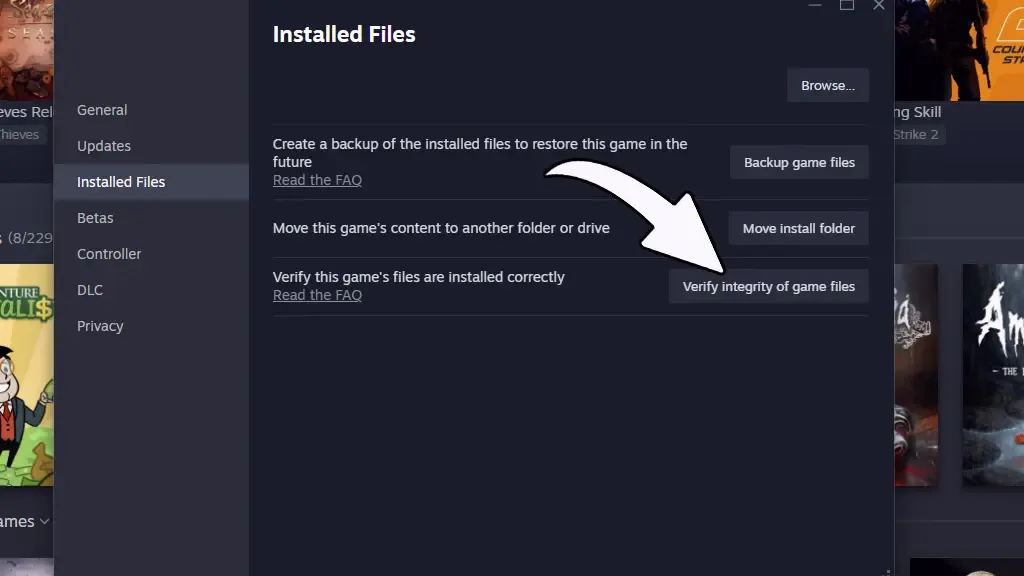
The best thing to do in such a situation is to verify the game files. To verify game files:
- First on Steam"Black Myth WukongRight-click on the game and open properties.
- On the left side of the Properties windowInstalled filesClick the " tab.
- Finally "Verify game file integrityStart file verification by clicking the " button.
You May Also Like: LOL Could Not Update Problem and Solution
Installing the latest versions of drivers
Updating the video card and other drivers on the computer will help solve most of the problems encountered in the Black Myth Wukong game. Players with an NVIDIA graphics card can enter the game without any problems by installing the last updated update.
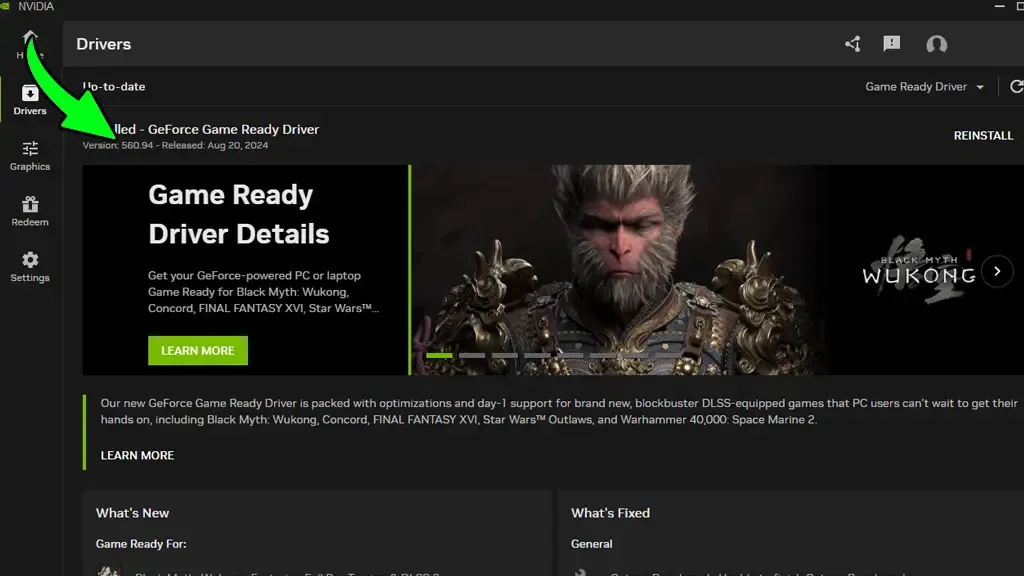
Upgrading the video card driver as well as the other drivers to the most up-to-date version is important both for the computer to work more efficiently and for a smooth gaming experience.
Changing Windows Language to English
Black Myth Wukong may not work properly in some language options as it is a newly released game. Those who have problems logging into the game can translate Windows into English. At the same time, Black Myth Wukong won't open the problem can be solved by selecting the United States as United States.
The viewing language can be determined in English from the Windows settings. For this process to take effect, it is necessary to restart the session or computer. After restarting the PC, the game can be logged in by making the zone selection by United States.
Result
In this article, Black Myth Wukong Won't Open Problem Solution We are here with methods. If you are having trouble entering the game, you can apply the methods in our content. In addition, to examine the solutions of the problems encountered in various games Game Error Solutions You can browse our category.