
 Add as a preferred source
Players with magnificent graphics and impressive plot starfield, some players do not work properly on their computers. Crash Problem Due to the most fun moment of the game, it can be annoying that the game is suddenly shut down. Starfield Crash and Shutdown Problem Solution Thanks to the methods we shared for the game, the game will not collapse again.
What is Starfield Crash and Shutdown Problem Solution?
Starfield has been loved and played by many players since the day it was released. The reason why the game is so popular is both the graphics and the gripping plot.
In addition, when different content and side quests are added, a pleasant game that you can play for hours comes out. Although the game is fun, some of the players are via Subreddit. Starfield Crash and Shutdown Issue reported their experiences.
There may be many situations in the background that cause the game to shut down. Especially players who eat Crash have to take a break from all the fun when the game is closed. Before the game is updated Starfield Crash and Shutdown Problem Solution By following your suggestions, you will be able to continue the fun from where you left off.
Change Windows Power Options
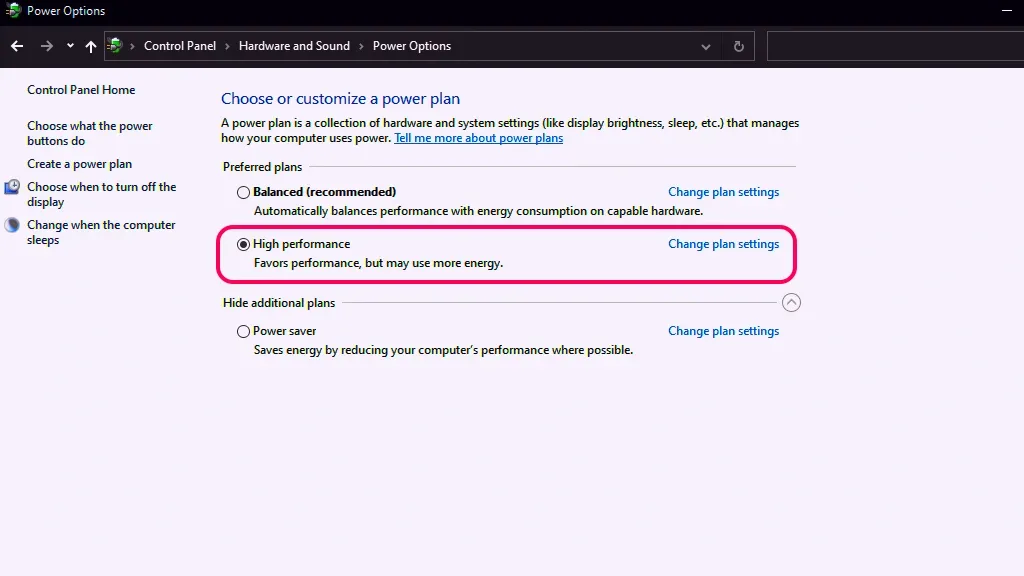
Starfield is a game that requires a lot of power consumption due to its graphics and animations. If you do not have a system with up-to-date hardware, the game may crash in the default power settings. To change the Windows power options, you should follow the steps below in order.
- Windows search bar" Power Options Type " and click on the first result.
- If you have not changed any settings, your computer Balanced It works in the power option.
- This setting" High performance "Switch to ". So the processor will work with full performance and the game will not crash.
Verify game files
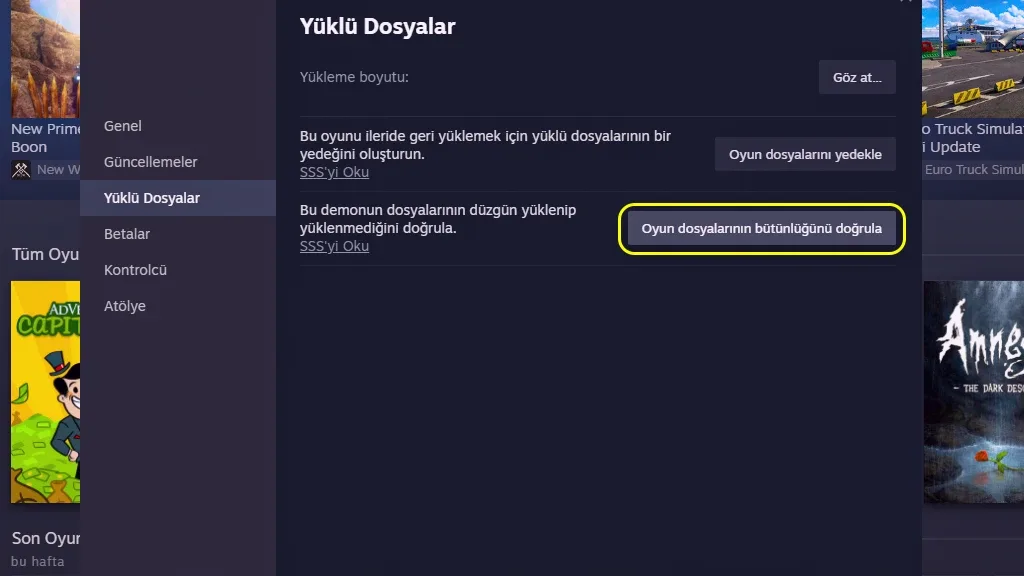
Starfield Crash and Shutdown Problem Solution The best method to apply is to verify the game files. When you verify the game files, all corrupt and missing files will be downloaded and uploaded from the beginning. Completion of this process may vary depending on your computer's hardware. To verify game files,
- Right click on Starfield game from Steam library and Specifications Click ".
- In the window that opens" Installed files Enter the " tab and Verify game file integrity Click the " button.
- Wait until the process is complete. If there is a missing or faulty file, it will download all of them from the beginning and complete the installation process.
You May Also Like: What Is the Sims 4 Crash Problem solution? Here Is the Detailed guide!
Use up-to-date video card drivers
If the video card driver you are using is old starfield crash problem you may encounter. Since it is an up-to-date game, we recommend you to use new graphics card drivers. First, completely remove the old driver from your computer and then download the new driver and complete the installation. After the installation is complete, restart your computer and enter the game.
Result
Starfield Crash and Shutdown Issue These are all the solutions you can apply for. If you know of different methods, do not forget to specify in the comments section. We have prepared for other games Error Solutions You can also look at their content.