
 Add as a preferred source

Actors who love to pretend as if they are in real life, on the Fivevem platform gta 5 He's having fun on his servers. Fivem Server Owners are also constantly making improvements to give players a stable gaming experience. However, since Fivem is a very heavy platform, most of the RP servers have FPS problems. Fivem FPS Boost The suggestions we include in our guide will significantly increase your FPS value on these servers.
Fivem FPS Boost Methods
- cache reset
- Changing graphics settings
When you download Fivem and enter any RP server, if you are constantly experiencing problems with stuttering or hanging up, you can get the best FPS value by applying the methods we will explain.
The following Fivem FPS Boost After applying the methods, you can get a FPS increase according to the update of the hardware on your computer. If your computer Fivem System Requirements If it is very backward compared to the equipment in it, you may not be able to play the game fluently.
Fivem Cache Reset
If you are entering and exiting too many Fivem servers, you may have a low FPS problem. The reason for this is that you are downloading and installing the scripts and mods on each server one by one. So how to reset Fivem cache?
- First, right-click Fivem and select Show file location.
- Then enter Fivem Application Data.
- In this folder cache, server-cache and server-cache-priv Delete named files.
After the process is completed, you will reinstall everything from the beginning when entering the server you are playing. Although it takes a long time to enter the server after deleting the cache, you can get a fluent gaming experience later on.
You May Also Like: Halo Infinite Startup Guide
Changing graphics settings
The best way to play FiveM RP servers fluently is to cut down the graphics settings. While reducing the graphics settings, it will be enough to reduce the game to a level where you can enjoy it.
After entering the server, open the game settings and click the Graphics tab. Change Shadow, Water, Particles and Grass Quality settings to Normal. If the video card on your computer does not have enough VRAM, you can also change the Texture and Shader Quality settings to normal.
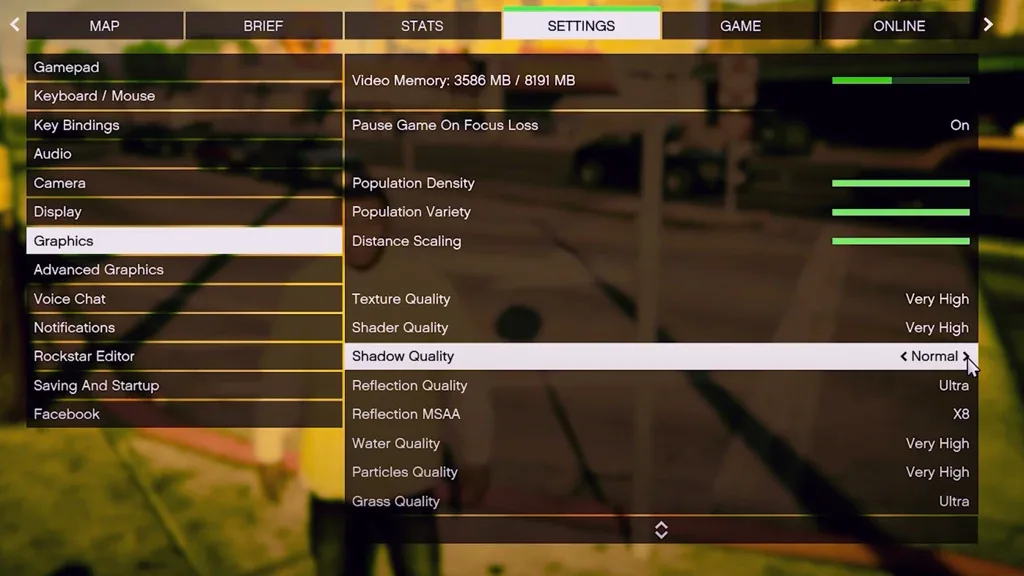
After making these settings, pull the bars next to the Population Density, Population Variety and Distance Scaling settings to the left completely. So there will be much fewer NPCs and car spawns around. This will allow you to earn more FPS.
Result
we can share with you Fivem FPS Boost Methods These were. After applying both methods, you will get a significant FPS. on the internet FPS Boost Files We would like to remind you that the settings in it may disrupt your computer. If you want to increase FPS without downloading any files, it will be enough to follow the suggestions in our article.