Ready-Made Discord Gaming Server Template

This content was independently prepared by the Oyuncu Konseyi editorial team. Sponsored and partnership content is always clearly labeled. Details: Editorial Standards
Table of Contents
The Discord application continues to develop itself actively. Now people no longer have to spend hours trying to set up servers, set up roles, or do other operations. Thanks to the Discord Ready Game Server Template, you will be able to easily obtain your game server with only one connection.
Today, it is seen as an important communication and communication application and has more than 100 million active users. discord In its application, each individual now wants to create his own community. Even if it is quite simple to use, it can be difficult for some users to make fine adjustments. Thanks to the innovation made by DC, which wants to save its users from such difficulties, server templates can now be shared.
About Discord Ready Game Server Template
The Discord ready-made game server template we have shared contains all settings from recording channels to roles. Roles such as broadcasters, bots and VIP memberships have been carefully crafted and applied to channels.
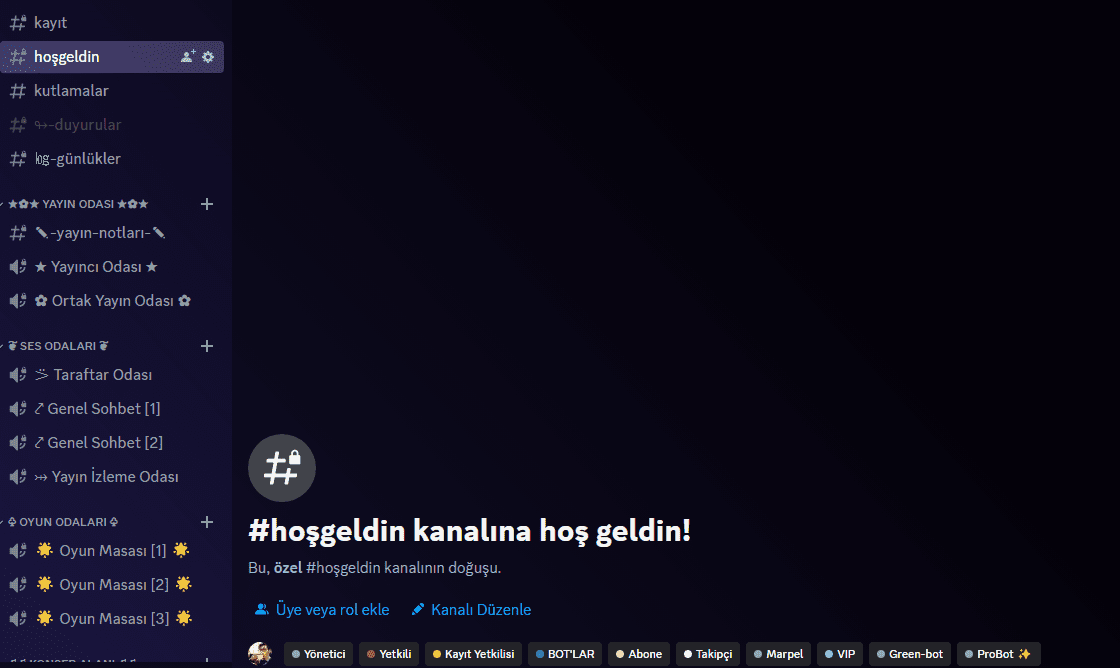
Even if it is quite simple to set up the server template, you should do this after creating the template, as the bots cannot be transferred. You should invite the bots you want to the server and apply their settings.
At the same time, this Discord ready game server template that we have shared contains many channels such as entertainment. The descriptions of all channels are left blank and their adjustments are made to suit the roles.
How to configure discord ready game server template?
Configuring such templates takes an average of about an hour. After completing all the configuration, you will have a fairly professional Discord server. So how do you do this configuration in the most accurate and healthy way?
STEP 1: to this link Create your server with the template by clicking.
Click on the link we shared above and create your server with the name you want from the Discord application or Discord Web. The server you create will come up with ready-made roles and settings.
STEP 2: Invite your bots such as recording, security, moderation to the server you created, as well as “bots” and adjust their settings.
STEP 3: Arrange the channels according to your request. If you want to duplicate the channels, right-click the channel you want to replicate so that the category settings where the channel is located do not go away, and select the duplicate channel option. In this way, you can assign the settings to the channels you will create.
Step 4: Arrange the role names and order according to your request. If you want to create more roles, you can make adjustments by looking at the ready roles. But the settings of these roles are required in your application for channels one by one. Therefore, it would be more appropriate to make additional roles in this template, whose main roles are ready.
Discord Ready Game Server Template We tried to help you. This prepared template has been prepared by “oyunkoyonsei.com” and cannot be used in any way without permission.