How Many Hours Have I Played Valorant?

This content was independently prepared by the Oyuncu Konseyi editorial team. Sponsored and partnership content is always clearly labeled. Details: Editorial Standards
Table of Contents
After enough ranked games, unrated matches, and late-night queues, it is natural to ask how many hours have I played Valorant? VALORANT gives you plenty of match statistics, but it does not present a simple lifetime-hours counter in the same way some game libraries do.
How to Check Your Valorant Playtime
One of the easiest ways to review your VALORANT activity is through a third-party statistics service such as Tracker Network. Depending on your profile visibility and the data available to the tracker, you can review activity by Act, mode, and other performance categories.
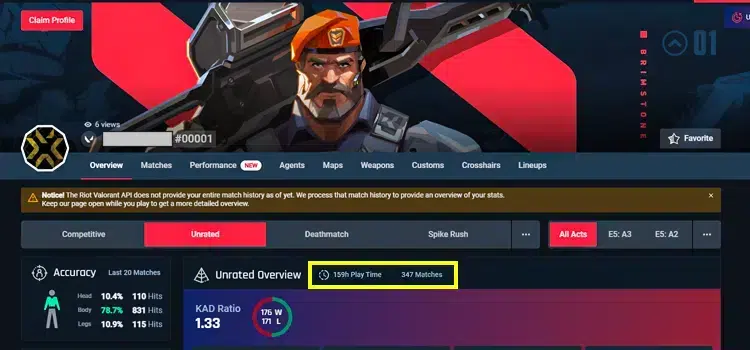
Step-by-Step
- Open Tracker Network’s VALORANT section and search for your Riot ID, or sign in and connect your Riot account.
- Open your VALORANT profile and refresh the data if the site offers a refresh option.
- Use the Act and game-mode filters to review the periods you want to measure.
- If a single lifetime total is not shown, compare or add the available playtime figures across Acts to estimate your overall time.
Why Your Total May Not Be Exact
Third-party trackers can only display the data they are able to retrieve. Older matches, private profiles, account-linking changes, or gaps in tracked history can make the displayed total different from your true lifetime playtime. Treat the number as a useful estimate rather than an official Riot account statistic.
If your goal is to improve rather than simply count hours, the same profile can also help you review win rate, K/D, headshot percentage, agents, maps, and performance by Act.
If you are also working on your in-game setup, you can check our Valorant crosshair codes guide.