
 Add as a preferred source
You can play Minecraft alone with your friends if you wish. To play the game with your friends, you can choose servers opened by other players or set up your own server. we prepared Minecraft free server opening Thanks to the guide, you can create a special server for you.
Minecraft free server opening
If you are tired of playing the game alone, you can open your own MC server and play it with those around you. If you do not have enough budget to open your Minecraft server, you can prepare a server that you can play with your friends without paying any fee by following the steps below.
How to open Aternos Minecraft server?
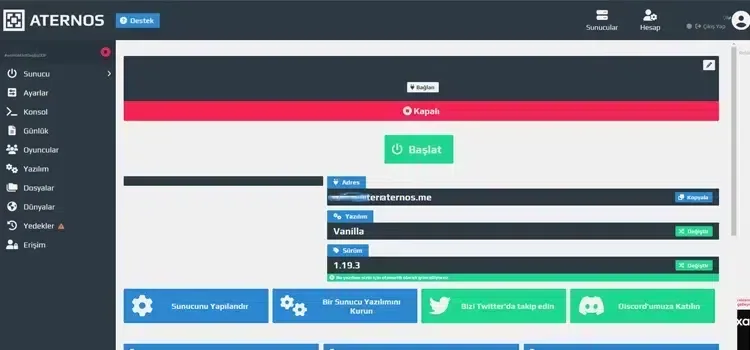
You can play unlimitedly on the free servers you open through Aternos. In order to do this, you first need to create an account from Aternos' website. You can also log in with your Google account if you wish. After creating your account and logging in, click the "Create a Server" and Create button in the panel that appears.
Before creating a server, click the Settings tab in the left menu and set the properties of your own server. Then switch to the Software tab and select the Minecraft version or the mode package you want to use. After completing all the settings, you can create your server by pressing the "Start" button on the server tab.
You May Also Like: Don't Starve Maxwell Character Guide
aternos servers, Minecraft free server opening makes the process very easy. If there is a point that you cannot do or get stuck, you can specify it in the comments section. More Game Guides You can refer to the relevant category.