
 Add as a preferred source
Forza Horizon 5, developed by Playground Games, made a problematic debut. It has been made a little more playable with updates containing quick fixes. Although the game is currently playable by most people, some players Forza Horizon 5 Freezing Problem and Instant Stuck may encounter such negative situations.
How to solve Forza Horizon 5 Freezing Problem and Instant Stuck?

Players who have played the game since it was first released Forza Horizon 5 muscle problem They couldn't enjoy the game because of it. Especially when there was too much load on game servers, the game completely freezes or the connection is broken, which bothers most players. Thereupon, the updates brought to the game made the Forza Horizon 5 more playable, but at this point we can say that they are a little late.
We can say that the optimization studies, which have been significantly improved compared to the first day, relieved FH 5 fans. Now the game can be played fluently at higher FPS values. Despite the improvements made forza horizon 5 freezing problem There are still players who have encountered it. we prepared Forza Horizon 5 FPS Boost Guide If this does not solve the problem, you can try the methods below and prevent the stuck problems.
Check your internet connection
If you do not have a stable internet connection, it will be very difficult to play Forza Horizon 5. Forza Horizon 5 Instant Stuck Problem The biggest reason you encounter him is that no matter how good your internet speed is, you cannot get this speed stably.
In this case, call your internet service provider and find out if there is a maintenance work. Then you can reboot your modem so that you can assign a new IP. If you are using fixed IP, you can request a new IP by calling your internet service provider.
Verify game files
You May Also Like: How to Resolve ETS 2 Cloud Synchronization mismatch?
Stuck problems in many games may be due to the fact that the game files are installed as missing or corrupt. You can solve this problem by verifying the file from the platform you downloaded the game. Corrupted and missing files will be downloaded again after file verification is complete. The completion time of the process varies according to the features of your computer and the size of the missing files. After everything is complete, we recommend restarting your computer and running the game as an administrator.
Try cmd configuration
With the correct cmd configuration, you can solve the stuck problem in the game. First, run cmd with administrator authority and type netsh int teredo show state and press enter. After doing this, if the result appears as state offline, we can move on to the next process. If everything is fine (Set State Serverma=teredo.remlab.net) type and press Enter again. As a result, if you see the text OK, the process is complete. You can log in to the game and try if the problem is solved.
Complete Windows updates
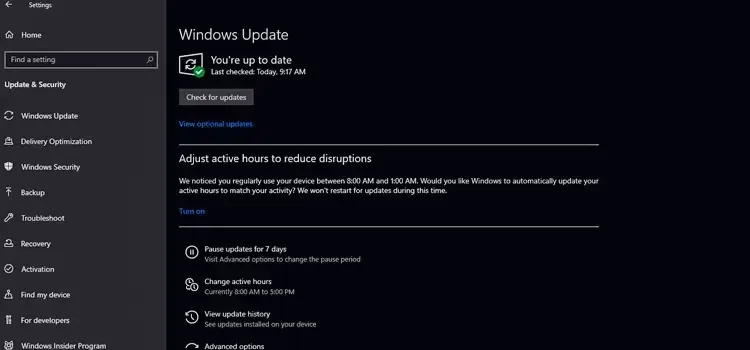
Downloading Windows updates in full and complete will help you fix freezing and hanging problems in games. Especially gamers using Windows 11 should keep their operating systems up to date. With the new versions of Windows 11, errors will be minimized and you will be able to play games more smoothly.
Some players live forza horizon 5 freezing problem We have offered solutions for We hope that thanks to these suggestions, you can achieve a smooth game experience. After trying the solution suggestions, you can specify whether the problem continues or not in the comments section.