
 Add as a preferred source
It can be a very bad situation when the sound suddenly goes away while acting. Fivem While playing on its servers, sometimes you may not be able to hear the voice of the other player or microphone problem Because of this, your voice may not go to them. In this article Fivem Sound Problem Solution You can get a smooth role-playing experience by following the recommendations we have included.
Fivem Sound Problem Solution
The problem of not going away from the microphone that happens to many players on Fivem servers can be very annoying. Especially when you have a sound problem at the most key moment of the role, the integrity of the event may be disrupted.
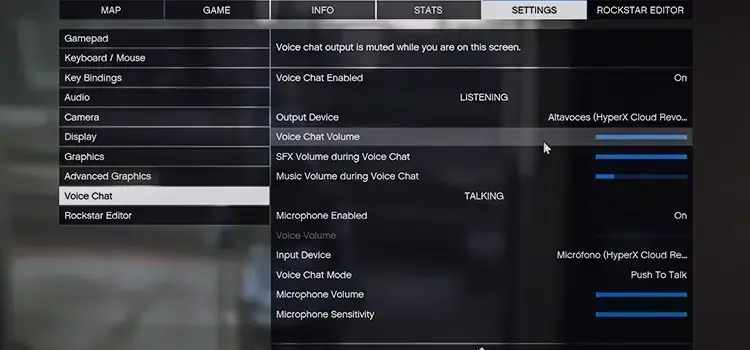
This problem can usually occur when players make some settings incorrect or incomplete. When you follow the steps below in rows, both microphone and other sound problems will be solved.
Fix Fivem sound settings
Fivem Sound Problem The solution is quite simple. On each server you enter, open the settings first. In the Settings window, click the Voice Chat tab. In Voice chat, first check the output and input device settings.
Here you need to choose the microphone and headset you use. Then turn the Voice Chat Enabled and Microphone Enabled options once and turn them back on.
Check headphone and microphone inputs
If you are having problems such as the sound of the voice not going to the other side or not being able to hear other players while playing on FiveM servers, check your headset. If you are connecting the headset or microphone with USB, you can try a different input. If you are connecting normally, you can test whether there is a problem with the inputs of the sound card.
You May Also Like: How to Fix PUBG Lobby Loading Slowly After a Match
Configure third-party programs correctly
Most players prefer to use third-party tools like Voicemeter while playing Fivem. If you are using VoiceMeter, rearrange the settings in that program. In addition, you need to select VoiceMeter in the Output and Input settings from the settings section in the game.
Result
Fivem Sound Problem Solution These are what you can do for. If the problem is directly in your headset or microphone, you may need to buy new equipment. The best you can use in games Gaming Headset Recommendations You can review your relevant location. Have a good time all of you.