
 Add as a preferred source

Although various improvements have been made since the day the ring was released, some players may face performance problems. Players who want to start the game from the beginning with the new DLC Hand Ring FPS Increase Thanks to its methods, you can gain a fluent experience.
FromSoftware Inc. developed by hand ring, selected as the best game of 2022. The quality graphics, animations and effects in the game were pleasing to the players. The following methods can be used to play the hand-Ring, which is now gaining popularity again, at high FPS values.
hand ring fps boost methods
Elden Ring offers players a tremendous gaming experience with their graphics and gameplay. Boss, who comes across with the tension of the environment from the first moment you step into the game, summarizes what may happen to you in the rest of the game.
You spend the hardest hours of your life until you learn the boss mechanics, but after you solve the mechanics, you can easily move on to the next area. You must play the game fluently in order to escape from the attack by the bosses just in time. The following hand ring fps boost methods Thanks to this, you can play the game at high FPS values.
hand ring graphics settings
You can try changing the graphics settings to increase the FPS you get. The graphics settings you will change in games affect FPS values differently.
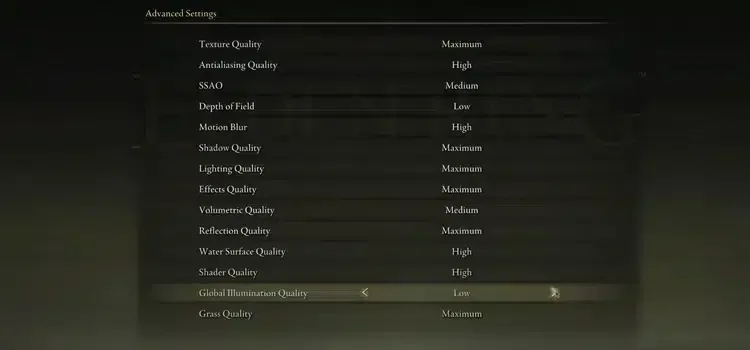
When you set the Texture quality of the hand to maximum or low, you won't gain much FPS, but this is not the case for a different game.
- Texture quality: maximum
- Antialiasing Quality: off
- ssao: Off or Medium (You can set it according to your video card.)
- Depth of field: low
- Motion Blur: low
- Shadow Quality: low
- Lighting quality: Low or Medium
- Effects Quality: maximum
- Volumetric quality: low
- Reflection Quality: low
- Water Surface Quality: high
- shader quality: high
- Global Illumination Quality: medium
- Grass Quality: medium
Keep drivers up to date
If you have not updated any driver from the day you bought your computer, you may experience FPS losses or even instantaneous stutters in games. Be sure to update the video card drivers to the latest version in particular.
You May Also Like: Euro Truck Simulator 2 Beginner Guide
After the video card update, you can make a special setting for the hand ring from the control panel of the video card. If you set the power management mode of the video card to high performance, you can get full performance.
Verify game files
If you are experiencing sudden FPS drops while playing the hand ring, you can try to verify the game files when you have a stable internet connection. In this way, you can fix corrupted files.
To verify the file, right-click the game from the Steam library and enter the Properties window. From here, you can start the process by pressing the Verify file integrity button in local files. The completion time will vary depending on your computer and internet speed.
Result
What we share in this guide Hand Ring FPS Increase With the methods, it will be possible to play the game +60 fps. We would like to remind you that thanks to the suggestions in our content, you can achieve different FPS gains depending on your computer features. If you can't decide how to start in the game OyunKonseyi.com/hand-ring-start-guide/ You can browse our Ring Start Guide content by clicking on the link!