
 Add as a preferred source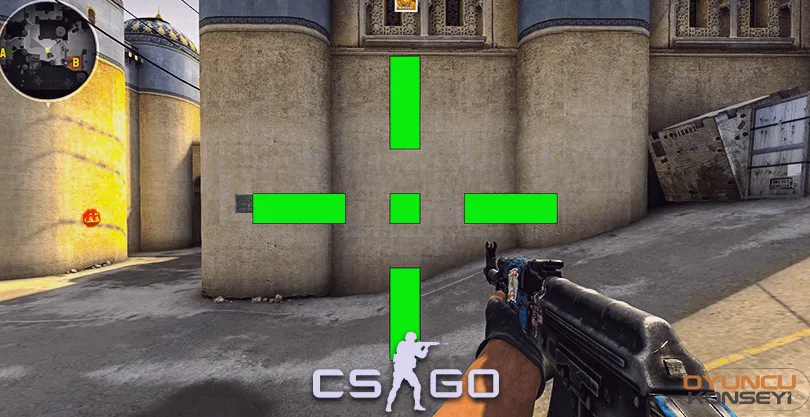
Each player playing CSGO has its own Crosshair settings. professional players CSGO Crosshair (Nishangah) settings and codes It varies according to how the players feel comfortable. Players who play advanced level can change the fate of the team in e-sports tournaments thanks to these settings. If you have a fixed crosshair setting, changing it may show decreases in your performance.
CSGO Crosshair (Nishangah) settings and codes
Each player can make better and more comfortable strokes by making a special crosshair setting. You can create the most suitable sight for yourself through the CS:GO Crosshair codes below. You can also use the config settings of professional players if you wish. But remember that these settings are specific to them.
- cl_crosshairSize = Sets the crosshair size.
- cl_crosshaircolor = Changes the crosshair color.
- cl_crosshairusealpha = Enables transparency to be turned on and off.
- cl_crosshairdot= Crosshair puts a dot in the middle.
- cl_crosshairalpha= Reduces the transparency of the sight.
- cl_crosshairthickness = Ensures the sight lines are thick.
- cl_crosshairstyle = Determines crosshair style.
Crosshair settings of professional CSGO players
Crosshair settings of professional CSGO players You can find the most suitable one for you by trial and error. However, professional CSGO players change the screen resolution as well as these settings. By making the screen resolution more compatible with the crosshair, they can hit the opposing player more easily.
Of course, when the trainings they do during the day are added to all these, super actions can occur. It will be enough to copy and paste all the crosshair settings of the professional players below to the console.
You May Also Like: Don't Starve Wickerbottom Character Guide
w0xic Crosshair Settings
- cl_crosshairalpha 200, cl_crosshaircolor 5, cl_crosshaircolor_b 129, cl_crosshaircolor_r 250, cl_crosshaircolor_g 50, cl_crosshairdot 0, cl_crosshairGap -1, CL_CrossHairSize 3, cl_crosshairstyle 4, cl_crosshairusealpha 1, cl_crosshairthickness 0, cl_crosshair_sniper_width 1, cl_crosshair_drawoutline 0,
Xantares Crosshair Settings
- cl_crosshairalpha 255, cl_crosshaircolor 1, cl_crosshaircolor_b 50, cl_crosshaircolor_r 50, cl_crosshaircolor_g 250, cl_crosshairdot 0, cl_crosshairGap -2, CL_CrossHairSize 2, cl_crosshairstyle 4, cl_crosshairusealpha 1, cl_crosshairthickness 0.5, cl_crosshair_drawoutline 0,
S1mple Crosshair Settings
- cl_crosshairalpha 255, cl_crosshaircolor 5, cl_crosshairdot 0, cl_crosshairGap -4, CL_CrossHairSize 2, cl_crosshairstyle 4, cl_crosshairusealpha 1, cl_crosshairthickness 0, cl_crosshair_drawoutline 0, cl_crosshair_sniper_width 1, cl_crosshaircolor_r 0, cl_crosshaircolor_g 255, cl_crosshaircolor_b 170,
Fallen Crosshair Settings
- cl_crosshairalpha 255, cl_crosshaircolor 1, cl_crosshairdot 0, cl_crosshairGap -2, CL_CrossHairSize 4, cl_crosshairstyle 4, cl_crosshairusealpha 1, cl_crosshairthickness 1, cl_crosshair_drawoutline 0, cl_crosshair_sniper_width 1,