
 Add as a preferred source
CS 2 Although it is still in the beta version, it has met with great interest from the players. Players who are entitled to join the beta of the game are eagerly waiting for the full version to be released. It will play the game more fluently before the full version Counter Strike 2 FPS Increasing Methods Thanks to this, it will be easier to get to the top ranks.
Counter Strike 2 FPS Increasing Methods
Rank will help you see opponents more easily when throwing matches Best CS 2 Graphics Settingswill make your job easier in the upper ranks. If you have installed the game for the first time, we definitely recommend that you make a competitive pre-game adjustment. Thus, the game will be much more optimized and you will get a stable experience. Here CS2 FPS Boosting Methods,
Turn on Performance Mode!
Processor power is very important to ensure rationality in every game. As a result of the full performance of the processor and good cooling, you will not lose performance in long-lasting games. To run the processor with full performance, you must change the balanced setting in the Windows power options to High Performance. When you restart the computer, the processor always works at full power. Highest CS 2 FPS value It will make you play with.
Change CS 2 graphics settings
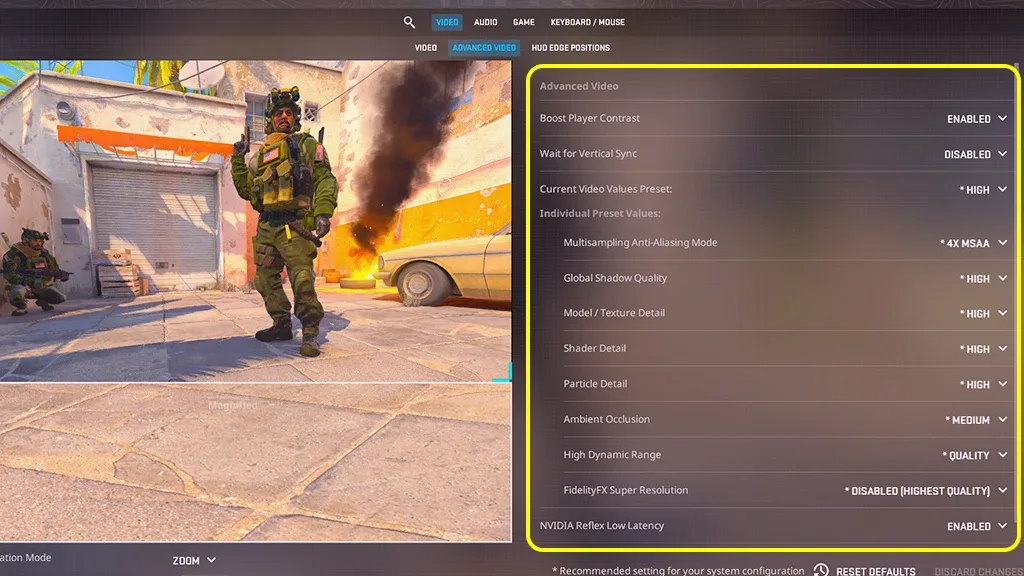
Optimized graphics settings Counter Strike 2 FPS Increase It is the most useful method for you. In this content we will include cs 2 graphics settings When it is configured correctly, you will play the game with the most FPS value.
- Monitor Resolution: You can set it for yourself.
- Boost Player Contrast: Enabled (it will not affect performance.)
- Multisampling Anti-Aliasing Mode: CMAA2
- Global Shadow Quality: low
- Model / Texture Quality: medium
- Shaders: low
- Particle Effects: low
- Ambient occlusion: low
- High Dynamic Range: quality
- fidelityfx: quality
- Nvidia Reflex Low Latency: enabled
Verify game files
Since CS 2 is still in beta, you can download some files incorrectly or incompletely while downloading. In this case, a decrease in the FPS value in the game will be observed. In order to prevent this, you need to verify the game files via Steam. After the process is completed, you can run the game as an administrator and continue the fun from where it left off.
You May Also Like: How to Make Scaffolding in Minecraft
Update video card drivers
Last Counter Strike 2 FPS Increase We have come to the method. increase cs 2 fps One of the ways is to use the newest video card driver. You must remove the old version from your computer before downloading the current driver. The program called DDU (Display Driver Uninstaller) is the only program where you can do this in the safest way. After the process is complete, restart the computer and download the latest driver. Don't forget to make the settings after completing the installations!
best fps you need to apply to get the value Counter Strike 2 FPS Increase These were the methods. After applying the methods in our content in order, there will be a visible increase in FPS. If there are other methods you know, you can specify them in the comments section. Other Game Guides For their content, you can browse the relevant category.