
 Add as a preferred source
Today, there are many FPS games that players can choose. CS GO (which still holds more popularity among these FPS games)Counter-Strike: Global Offensive), played by a million players daily. If you want a fluent gaming experience while playing Counter-Strike: Global Offensive, what we share in our content CS GO Startup Options You must enter the game.
What are the CS GO launch options?
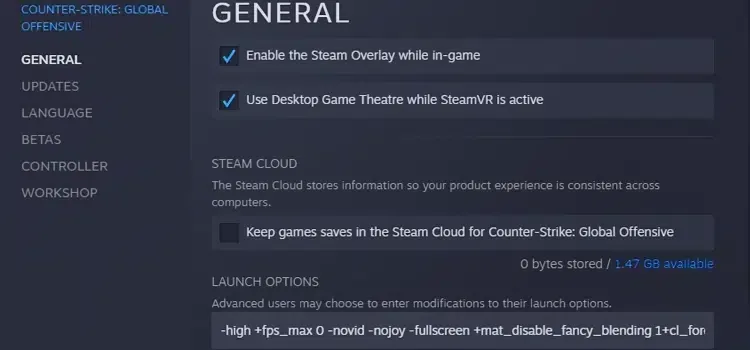
Developed by Valve Counter-Strike: Global Offensive The game can be played fluently by most players. Due to the competition in the game, players can reach a more fluent gaming experience by minimizing the graphics settings. However, some players may have a lot of FPS drop or hanging problems no matter what they do. The following Startup options It will increase the FPS value you will get from the game.
- +r_dynamic 0 or 1: It allows you to change the lighting in the game. If you set it to zero, you will enter the game with these lightings completely closed.
- -noborder: When the game is started in windowed mode, it closes the border frames.
- +r_drawparticles 0: It closes the particles that occur when you shoot anywhere or in explosions.
- +cl_forcepreload 1: It loads all textures before entering the map you will play. The loading screen will take a while, but you will get stable FPS values in the game.
- +mat_queue_mode 2: It will make the processor work more stable for CS GO.
- -nod3d9ex1: It is used to turn off the 9EX feature according to the model of your video card. When you enter this command, you will get a performance increase.
- -novid: Allows you to skip the promotional video at the game entry.
- -nojoy: Contributes to performance by disabling computer-mounted gamepads for CS GO.
- -threads: It is the command where you can determine how many cores the processor will use. If you type " -threads 8" in the CS GO startup options line, it will transfer 8 cores of your processor to the game. Before using the command, we recommend that you learn how many cores your processor has.
- -high: Starts the game with high prioritization.
Where to write CS GO launch options?
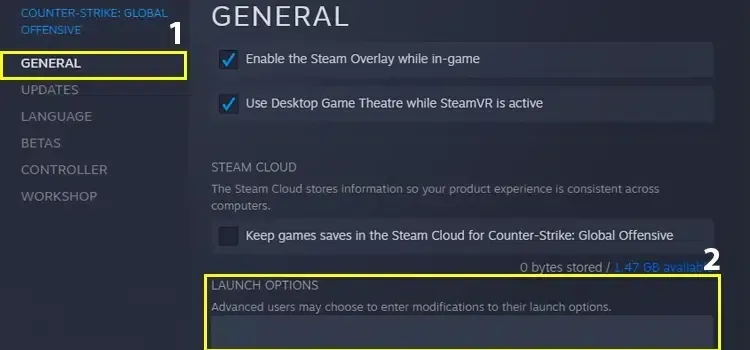
Players who are new to the game Where to write CS GO launch options? He asks the question too much. First run Steam as administrator to write the commands that provide the FPS increase we shared above. from the steam library Counter-Strike: Global OffensiveRight click and open the Properties window. You can write the commands you want to use in the section at the bottom of the small window that opens.
You May Also Like: How to Make an Anvil in Minecraft
In our article we have included Best CS GO launch options Thanks to you, you can play the game fluently. If there are useful commands that you know, do not forget to specify them in the comments section. Cs Go Best FPS Settings We would like to remind you that you will reach high FPS values by applying the graphic settings we offer.