
 Add as a preferred source
Valorant, one of the competitive games of Riot Games, aroused great interest in the e-sports world. Players want to see the FPS and Ping values in the game to play more professional games. In this article Showing Valorant FPS We will explain step by step how to do the process.
How to show Valorant FPS?
- First, enter the Valorant in-game settings.
- Click the Image tab in the top menu.
- From the drop-down menu, go to the Statistics section.
- Finally, just click the text box from the right side of the client FPS tab from the options.
By following these steps in order, you can open the indicator where you can control your instant FPS value during the game. At the same time, to open the Valorant ping indicator,
- From the same menu, just click the text box to the right of the Network round-trip time option.
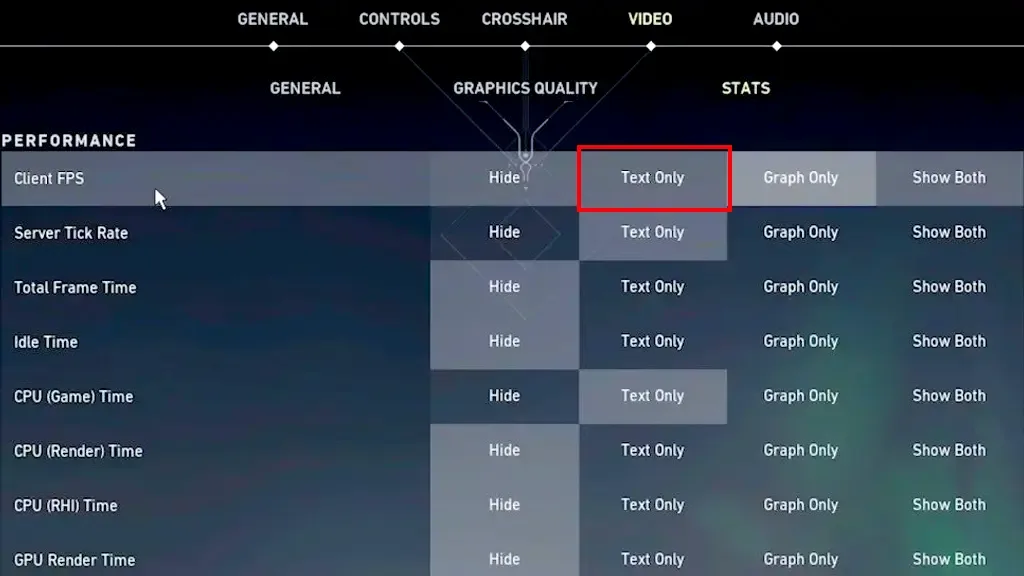
If you are playing the games at a professional level, you may want to see the instant ping and fps values. Compared to other games Show Valorant FPS and Ping Your effort is very small. With these settings we have made, we can easily open the indicators. Also, these settings are not shown as text only.
You can also display the FPS and PING values graphically, but it can cause attention loss in competitive games. Therefore, we recommend using only the text option. You will now be able to instantly see the FPS and Ping values on your screen in a text-based way.
You May Also Like: Secret Neighbor Character Abilities
What is the Valorant FPS display key?
Showing Valorant FPS Although the number of players looking for the key is very high, we have bad news for them. There are no keys to show the FPS value in the game. Instead, you can learn the instant FPS value by following the steps above in order.
Result
In this guide we prepared Showing Valorant FPS And we explained how the ping opening process is done step by step. Don't forget to let us know if there is a point you are stuck on about this. For more informative content https://oyuncukonseyi.com/oyun-rehberleri/ You can click the link. Lots of head shots!