
 Add as a preferred source
League of Legends can be played fluently on many computers today. However, some players may still have problems with FPS. We will share in this content LOL FPS Boost 2025 Thanks to the current methods, it will be possible to play the League of Legends game at higher FPS values. Here are those methods!
LOL FPS Boost 2025 New Methods!
On different platforms you have viewed now LOL FPS Boost You've seen that the same things are always told about the same thing. In this article, we will share with you the settings that will allow you to get high FPS in the game without closing everything. We would like to make a small reminder before trying the following settings.

Since the computer hardware of each player is different, the FPS increase you will see after making the settings we will give will be different on everyone's computer. However, at the end of the day, the increase in the fluency of the game will be noticeable. Let's League of Legends FPS Boost Let's take a look at the methods!
Custom video card settings make
If you have only installed the driver from the day you installed the external video card and made no adjustments, you have lost a lot of FPS in the League of Legends game. When you install the graphics cards drivers, they don't always work at full power. First of all, you need to run the video card at full power. You can earn extra FPS with just a few settings changes without overclocking the external video card you are using.
In order to do this, you first need to set the Power Management Mode setting from the video card driver settings. You should change it to performance. Then turn off the associative filtration and anti-aliasing properties. Finally, by setting the texture filtration setting to performance or high performance, you can get a good FPS increase especially in LOL.
Lower in-game graphics settings!
The game's own settings are adjusted according to the maximum quality allowed by computer hardware. You can earn a little more FPS without spoiling the appearance of the game too much by making some changes in the in-game settings.
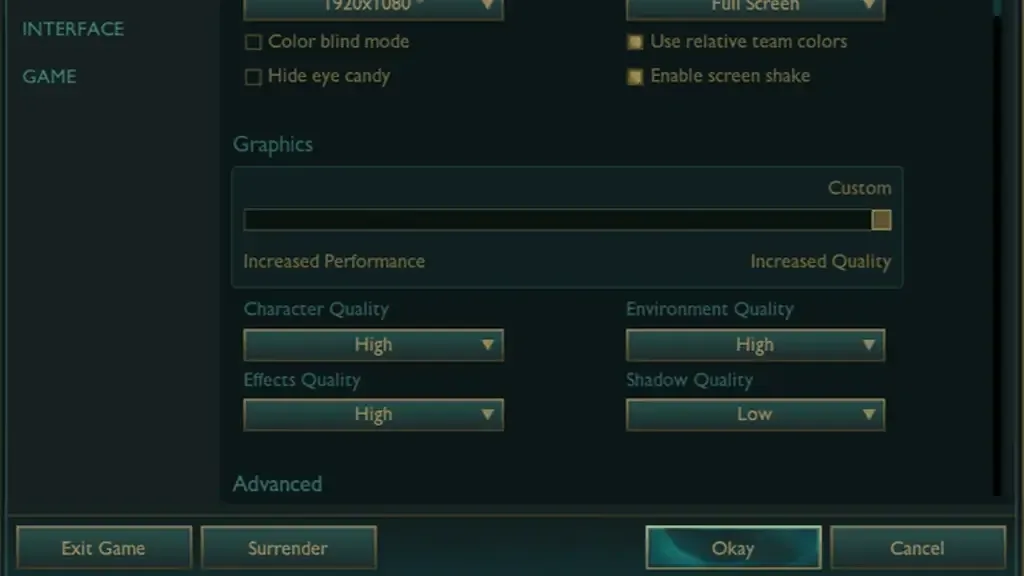
Before you start making in-game settings, make sure the game is in full screen mode. There is a difference between the FPS you will receive when you play the games in full screen and the FPS you will receive in the windowed mode. Therefore, always playing the full erkan LOL FPS Boost will be useful.
You May Also Like: EFootball 2022 FPS Boost Guide
Hiding visual plugins will save you 4-5 FPS, so you can turn on that feature. Although the characters in MOBA games are very well designed and visually pleasing, if your goal is to increase FPS, the character quality does not matter. Playing the character quality at the lowest will not affect you much at this point, but it will increase your FPS value. In addition, effect and environmental quality are the most important factors that determine the instant FPS value.
After making all these settings, you can get a great increase in FPS by turning off the shadow and anti-aliasing. If you don't have a very old graphics card, you can open the anti-aliasing setting to make the characters look a little clearer.
Collect new computers!
League of Legends FPS Boosting Methods If it doesn't work, it's time to collect a new computer. Advanced PC collection wizard You can play LOL fluently by selecting parts that are compatible with each other without exceeding your budget, by collecting new generation computers without exceeding your budget.
Result
In this article, we share, LOL FPS Boost You can reach the best FPS value in the game by applying the current methods in 2025. If you know different ways, don't forget to mention it in the comments section! More Game Guides You can visit the relevant category of our site.