
 Add as a preferred source
Pubg Mobile version is played by many players as it can be played comfortably on phones and tablets. Continuous updates have made PUBG Mobile much better and fluently playable. With the improvement of the hardware of the phones, many players started playing 90 FPS PUBG. Making PUBG Mobile 90 FPS You can play the game at high FPS values by applying what we have told in our guide.
How to make PUBG Mobile 90 FPS?
If you have been playing the PUBG Mobile game since the day it first came out, you may have noticed the developments in the game. At first, there were fps problems, but now the game can be played at 60 fps. However, this varies according to the hardware capacity of the device you are using. If you have just started the game, we recommend you to play at 60 fps and get used to it.
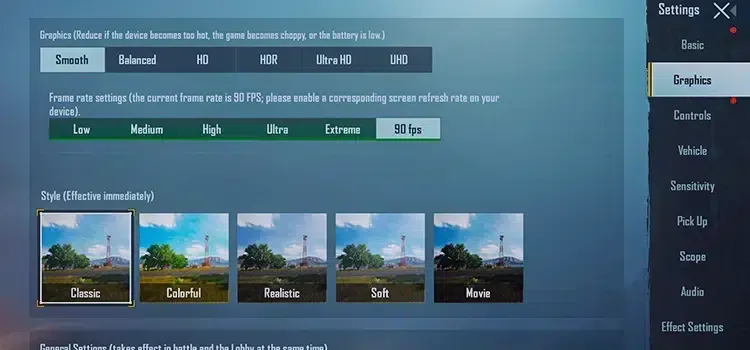
After a while, you can install the GFX Tool, which allows you to make PUBG Mobile 90 FPS, and make the following settings. However, the settings you will make with this tool are entirely your responsibility. GFX Tool allows you to optimize the game more by making settings as an extra in some games. When you use it consciously, you can play games more fluently and in better resolutions. Here 90fps pubg GFX Tool settings for experience,
- Change the version to 0.9 GP.
- Reduce the resolution a little lower than the default.
- Select "Smooth Graphic" from the graphics settings.
- Select FPS to 90.
- Set graphics for Android 7.0 or higher.
After making the above settings 90fps pubg you can play. If your phone supports 90 fps, you don't have to deal with them. All you have to do is go into the settings of the game and select 90 fps from the frame rate setting section. We would like to remind you that the battery will run out very quickly while playing the game at high FPS values.
You May Also Like: League of Legends ADC Champions
we hope Making PUBG Mobile 90 FPS You have found our guide useful. If there is something you cannot do, you can contact us in the comments section. If you could not reach the desired FPS value after making the settings pubg mobile fps increase You can check our guide.