
 Add as a preferred source
Valorant players prepare their own unique crosshair types to see their opponents more easily. In addition, there are players who want to use the crosshair types used by other players in deathmatch or competitive matches. It was very difficult to do this before, but Valorant Crosshair Copy Thanks to the system, players can copy crosshairs more easily.
How to copy Valorant Crosshair?
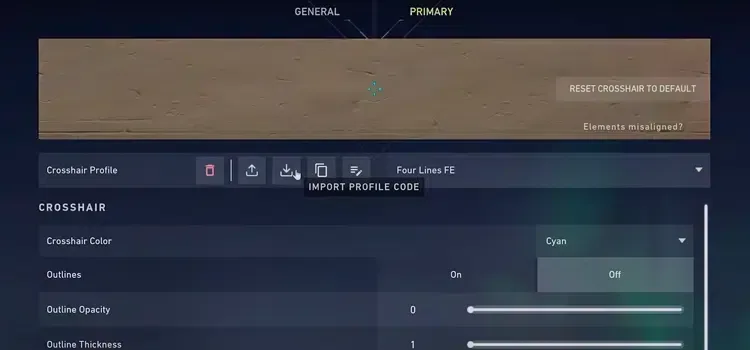
If you like the sights used by the players you come across in the games, we would like to point out that you can now copy them. After you die in any match you enter in the game, you can copy the sight type of the person you are watching by typing " /cc" while in the audience mode. But before doing so, we recommend saving your own crosshair settings.
If there are crosshair types that you see and like on different crosshair sites, you can also transfer them to the game. Valorant professional player crosshair codes You can follow the steps below in order to transfer the codes from third-party crosshair making sites to your game.
- First copy the crosshair code you like.
- Switch from the game settings to the Crosshair settings and from there to the Primary tab.
- Click the downward arrow in the section that says Crosshair Profile and paste the code you copied here.
- When you enter the game, your crosshair type will be changed.
Valorant Crosshair Copy We shared with you what we know about it. We think that the guide we prepared will be useful. If there is a place that you cannot do, you can reach us in the comments section. Lots of HS!
You May Also Like: Highest-Rated Turkish Players in EA Sports FC 27