
 Add as a preferred source
Battlefield 6 wide maps can force the hardware differently from single-player FPS games due to intense demolition and crowded conflicts. Especially sudden FPS drops and low 1% LOW values can cause a feeling of hanging when aiming, even if the average framerate seems to be high. Battlefield 6fps boost What graphics settings do you need to change, and how can you play more fluently without compromising the image quality?
Investigate the causes of FPS loss first
Making all the graphic options low in Battlefield 6 does not give the same result in every system. While lowering the graphics settings on computers that are plugged into the video card limit, it can make a significant difference, while the same changes can affect the FPS much less when the processor limit is reached.
Tracking GPU usage and frame rate during the game makes this distinction easier to understand. If the GPU is running around 95 percent to 100 percent, it makes sense to reduce the graphics load. If the GPU usage remains significantly lower, the CPU may be limiting if the FPS does not rise.
Which graphics settings should be lowered first?
It is especially recommended that some graphic options of EA's own performance recommendations are lowered to the low level. These are settings where you can reduce the GPU load without completely changing the overall structure of the image. To increase BF 6 FPS, you can first change the following options.
- Undergrowth Quality for low
- Effects Quality for low
- Volumetric quality for low
- Lighting Quality for low or medium
- Local Light & Shadow Quality for low
- Sun Shadow Quality for low
- Post Process Quality for low
- Screen Space Reflections for off
Especially volumetric effects, shadows and environmental lighting can increase the video card load in intense conflicts. Changing these options before you completely lower the graphics quality can give a more balanced result.
Do not set the texture quality setting immediately
Texture quality should be evaluated a little differently from other settings. Leaving textures at the high level on a graphics card with enough VRAM may not affect FPS as much as shadow or volumetric settings. The situation changes if the VRAM capacity is limited. In particular, the combination of high resolution and high tissue settings can cause stuttering or VRAM overflow. In such a case, it makes more sense to reduce the texture quality level to medium.
Battlefield 6fps focused graphics settings
A mixed profile can be used for gamers targeting high frame rate, instead of minimizing all options. The following settings can be tried as the starting point.
- texture quality Medium or High
- texture filtering high
- Mesh Quality medium
- Terrain Quality medium
- Undergrowth Quality low
- Effects Quality low
- Volumetric quality low
- Lighting Quality medium
- Local Light & Shadow Quality low
- Sun Shadow Quality low
- Reflection Quality low
- Screen Space Reflections off
- Post Process Quality low
- Screen Space AO & GI Off or low quality
- High Fidelity Objects Amount medium
This profile is a suitable starting point, especially for gamers who use monitors with high refresh rate at 1088P and 1440P resolutions. If your system is passing the target FPS comfortably, you can upgrade options such as texture, terrain and lighting one by one later.
Turning off Motion Blur and Camera settings affects more than FPS
Although World Motion Blur and Weapon Motion Blur do not directly provide large FPS increases, they help keep the image cleaner in fast camera movements. In competitive gameplay, it can provide more comfortable target tracking to bring both settings to the lowest possible level.
You May Also Like: Where to Find the 3D Printer in Sons of the Forest
Should DLSS, FSR or XESS be used?
If you are reaching the limit of high-definition video card limit, UPScaling is one of the most effective performance tools that can be used in Battlefield 6. DLSS, Radeon side FSR and Intel Arc systems can be preferred for RTX graphics cards.
The quality mode should be tried first. If the target FPS is not caught, it makes more sense to switch to the balanced level. Performance mode, on the other hand, can be considered as the last option, especially since it can overestimate the image of distant players at 1080p resolution. If you are already getting the target frame rate in native resolution, it is not necessary to use upscaling.
Should Frame Generation be opened in BF 6?
Frame Generation can seriously increase the FPS value shown on the screen, but the frames produced do not increase the real rendering speed of the game at the same rate. Therefore, the high FPS figure does not always mean the lower input latency.
It is more correct to prioritize real FPS as much as possible in competitive infantry conflicts. Your system already has a comfortable base frame rate and you want more visual fluency, a Frame Generation can be tried.
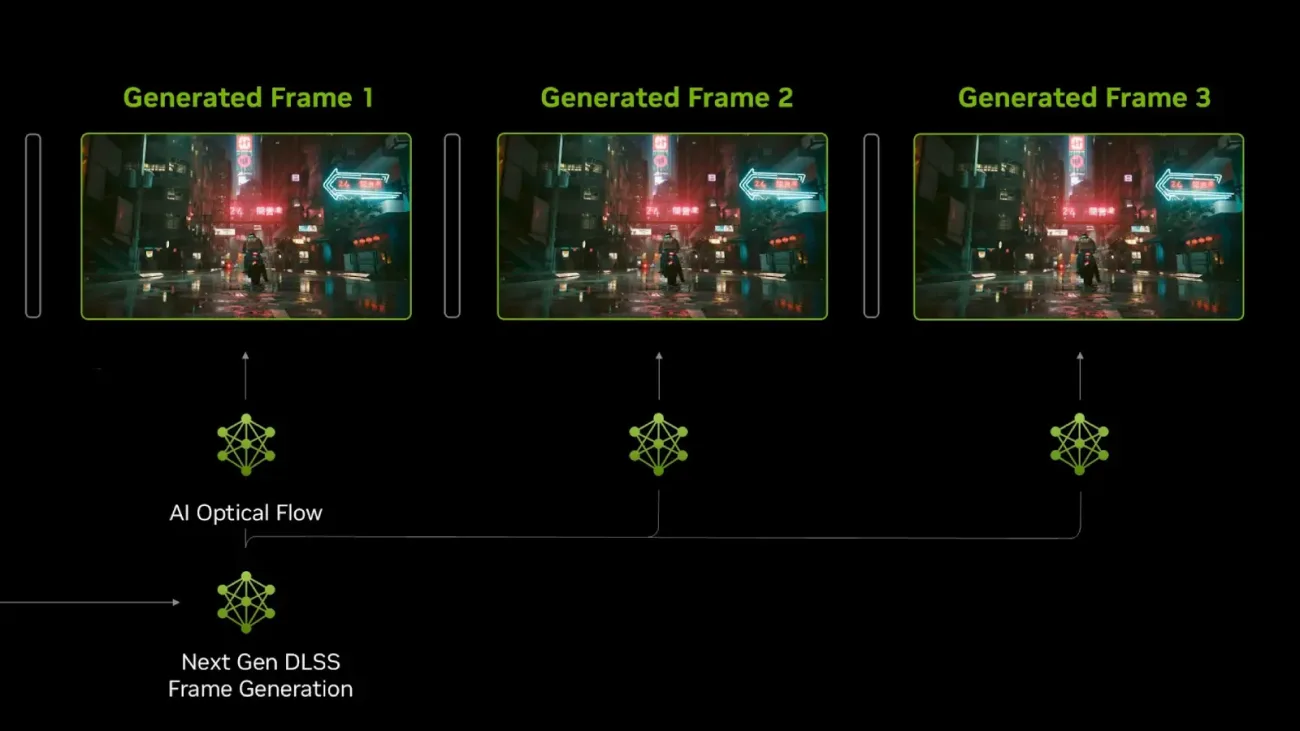
The current versions of Battlefield 6 also have higher multiplier options for Multi Frame Generation on the NVIDIA side. Especially in options such as X5 or X6, even if the FPS counter is too high, the mouse response and artifacts that may occur in the image should be evaluated separately.
Should NVIDIA Reflex be turned on?
Using Reflex Low Latency on supported NVIDIA graphics cards helps reduce input lag. It makes sense to keep the Reflex option open, especially for competitive players who are targeting high FPS.
If you have an option on your system, Enabled + Boost mode can also be tried. However, if you are using a more sensitive system about temperature and power consumption, it would be more accurate to compare with the normal enabled setting.
Frequently Asked Questions
How to increase Battlefield 6fps?
FPS can be increased by lowering the graphics options that affect performance such as Undergrowth, Effects, Volumetric, Shadow, and Post Process. Turning on the Hags feature and using the DLSS, FSR or XESS method suitable for the video card can also help with the performance.
Should DLSS Open in Battlefield 6?
DLSS Quality is a good starting option if you are using RTX graphics card and reaching the GPU limit, especially at 1440p or 4K resolution. If you are already reaching the target FPS value in native resolution, you are not required to use DLSS.
Should Frame Generation Open in Battlefield 6?
Frame Generation is not always ideal in competitive gameplay as it can provide higher-looking FPS, but can also increase login latency. If your basic FPS is high enough and your priority is more fluid, you can open it and compare it on your own system.