
 Add as a preferred source
The HDRP graphics update, which Rust players have been eagerly waiting for, has finally been released. The NVIDIA Reflex feature that comes with this update will also significantly improve the gaming experience. Ok then What is Rust NVIDIA Reflex?
What is NVIDIA Reflex?
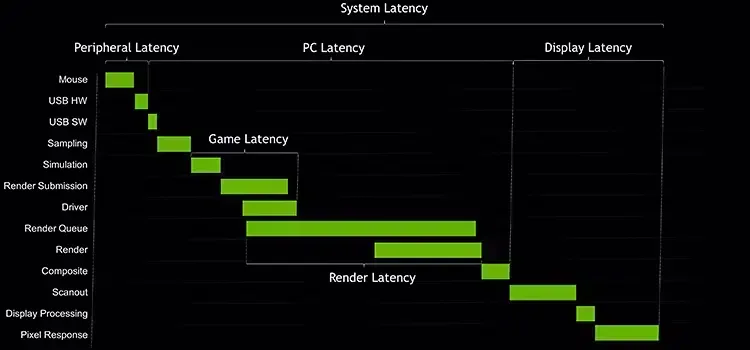
Before explaining how Nvidia Reflex works in the Rust game, we would like to give a little information about this technology. NVIDIA Reflex is a technology that provides players with a fluent and lag-free gaming experience by minimizing delays in games. Reflex technology is very useful, especially in competitive games. By reducing the delays that may occur in between, the moment you make your move, this movement allows you to reflect this movement in the game in the fastest way possible.
How does Rust NVIDIA Reflex work?
In competitive games, values such as the fluency of the game and the speed of the screen (renewal speed) are very important. If you are playing with FPs better than rival players in Rust, you can survive very easily. Arrived on 6 May 2021 Rust update It brought with it this technology, which is necessary for players to play with less delay.
RUST While firing the players to the escaped opponents, the bullets they fired due to the delay were not processed correctly and they could not hit them. NVIDIA Reflex Technology Thanks to this, there will be a 38% reduction in the delay time. In this way, it will be easier to hit moving targets. Thus, Raid and one-on-one clashes with the team will be even more enjoyable.
How to open Rust NVIDIA REFLEX?
Before explaining how to activate NVIDIA Reflex technology, let's explain which graphics cards users can benefit from. Players with a NVIDA GeForce 900 series and above graphics card will be able to use this feature. The steps you will follow to open Nvidia Reflex,
- First, open the game settings with the ESC key.
- Click on the graphics section and change the NVIDIA Reflex section to "Open and Boost".
- Change the Nvidia Reflex Latency option to On.
You May Also Like: Euro Truck Simulator 2 Beginner Guide
With the 3 steps above Rust Nvidia Reflex You can open the feature. We would like to point out that this technology will not reduce your FPS value. On the contrary, it will be useful for you to play the game more stable. However, it is worth remembering that this feature may cause meaningless light refractions in some low settings. This situation will be easily resolved with updates that include minor fixes in the coming days. MORE RUST game guide Stay tuned for our site!