
 Add as a preferred source
Discord, which has given players the opportunity to communicate with their friends free of charge since the first day it was released, was updated over time and made much more useful. Added with the last update Discord Survey Featurewas expected for a long time by the players. Thanks to the steps to create a survey that we will include in this guide content, users will be able to make special surveys for themselves. Let's take a look at these steps together.
What is a discord survey?
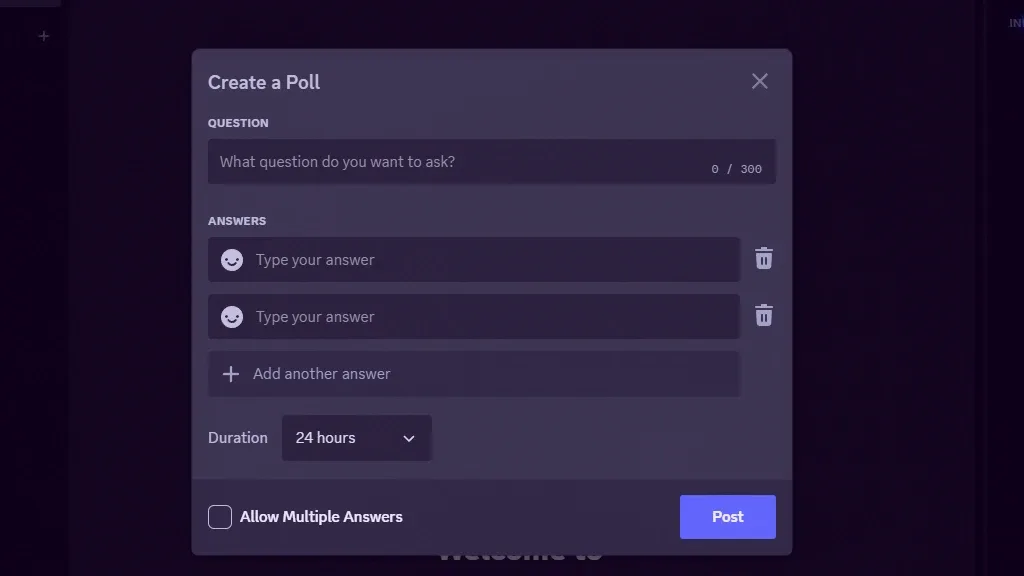
Discord Survey Feature, allows users who are authorized on the servers they participate in or have their own DC server to create a survey. There is a maximum of 300 characters for survey questions and 55 characters for answers. The survey time can be extended from 1 hour to 1 week.
The Discord Survey Creating feature simply offers two different answer options. However, don't be fooled by this, it is quite easily possible to increase the number of answers to questions. Various emojis can be used in responses to make the generated surveys more fun.
In addition to all these, multiple answers can be given to the questionnaires instead of giving a single answer. Multiple response options can be determined by the person who created the survey. Users are wonderingHow to do a Discord Survey?You can continue to review our content to find the answer to the question.
What are the steps to conduct a Discord Survey?
- First run the Discord app as administrator.
- After the application is opened, log in to your account. If you do not have an account registered to your e-mail address, you can create a new one.
- On the server you are participating in, the left of the message writing area is "+Click the " button.
- In the small menu that opens"Create SurveyClick ".
- Enter the questionnaires and answers you have determined in the relevant fields.
- Select the time you want to answer the questionnaire.
- If you want more than one answer to the question asked in the questionnaire, at the bottom "Allow multiple answersClick ".
- To add more than two answers to the survey question "Add another answerClick the " button and add more answer fields. (Max 10 pcs.)
- If you don't like the answer you added, or if you want to reduce the number of responses, click the Trash icon to the right of the answers.
- Finally, after checking the questions and answers, to publish the questionnaire"consignmentClick the " button.
After following each step above in order Discord Survey Creating The process will be completed without any problems.
You May Also Like: Are Free VPNs Safe?
Result
Detailed discord survey We have come to the end of our steps. If you encounter a problem with creating a survey, you can contact us in the comments section. Also, to get information about Mee6 commands that you can use on your discord server OyunKonsei.com/mee6-commands/ You can click the link.