
 Add as a preferred source
Cities: Skylines, developed by Colossal Order, was released in 2015. Offering a magnificent city-building simulation to players, Cities: Skylines are regularly developed and new content is being added to the game. It is especially loved by the players that it offers additional packages and mod support. However, players playing with mod packs can experience FPS losses. Cities Skylines FPS Boost Guide You can experience the game much more fluently.
Cities Skylines FPS Boosting Methods
Cities: Skylines can be played at much better FPS values than when it was released. However, as the game progresses, FPS decreases may occur due to factors such as the population, the number of cars and buildings, which grow. We can say that the players who are not content with playing the vanilla version of the game and have much more content with mod packages feel this situation too much.
It is quite normal to lose FPS as more models and graphics are added to the game with the mod packages. I will include in this content Cities Skylines FPS Boost Methods will relax your computer and help you get slightly higher FPS values from the game.
Cities: Skylines in-game graphics settings
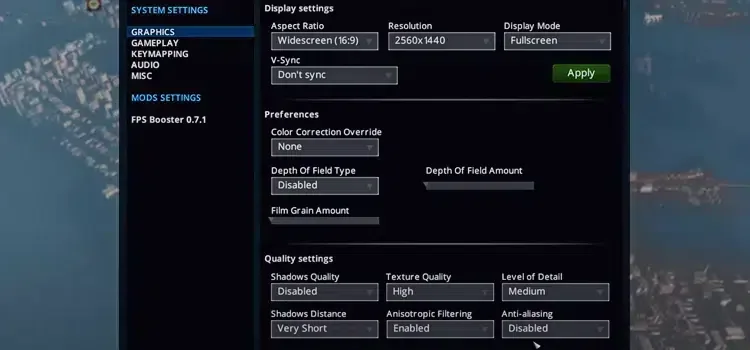
Changing in-game graphics settings is a very effective method for gaining FPS. However, when you reduce all the graphics and options, you will also experience a worsening of the graphics of the game. You can earn FPS without experiencing too much graphics loss using the following settings.
- Depth of Field Type: disabled
- Shadow Quality: disabled
- Texture quality: Medium - High
- Level of Detail: medium
- Shadows Distance: very short
- Anisotropic Filtering: disabled
- Anti-aliasing: Disabled (You can open this setting according to your video card.)
Cities: Skylines FPS Increasing Mod Pack
Cities Skylines FPS Boost We have come to the suggestion that we think will be the most beneficial in the methods. Cities: Skylines are a simulation game with mod support, so there are thousands of mod packs on the Steam Workshop. These mod packs include quality content that changes every area of the game. If you have FPS problems in the game, you can make your game fluent by installing the mod package called "FP Booster". Before installing, we recommend that you research which mod packs it works in harmony with.
You May Also Like: Best Game Development Software
Remove unnecessary mod packs
Mod packs enrich the content in the game a lot. Most players randomly install and test the mods they see and like in the Steam workshop. But after testing it doesn't bother to remove it. Mod packs, which players do not download and use again, may conflict with other modes after a while and cause problems. For this reason, we recommend that you download only the mods you will use after creating a list of Cities: Skylines Mod Packages.
Cities Syklines FPS Boosting Methods That was it. If you have suggestions other than the methods inside, you can send them to us in the comments section. More Game Guides You can browse the relevant category for.