
 Add as a preferred source
NFS Unbound is available for players who have purchased a Palace Edition or have an EA Play Pro subscription. You can also experience the game for 10 hours free of charge if you have EA Play or Xbox Game Pass subscription. In this process, after some players ran the game once, their game suddenly closed and could not enter the game again. nfs unbound opening problem You can continue your racing adventure from where you left off by applying the solutions we suggested for
How to solve the NFS Unbound Opening problem?
Although the game was developed by a well-known and talented team, some players encounter mistakes. We can say that this is quite normal. Players who download Need for Speed Unbound with great excitement and get an error in the game can be discouraged. In particular, players who have stuck with the NFS Unbound loading screen will understand this very well.
Few players meet nfs unbound opening problem You can continue the fun at full throttle with the solution suggestions we recommend for. We recommend that you apply the solution methods we recommend in order.
Verify game files
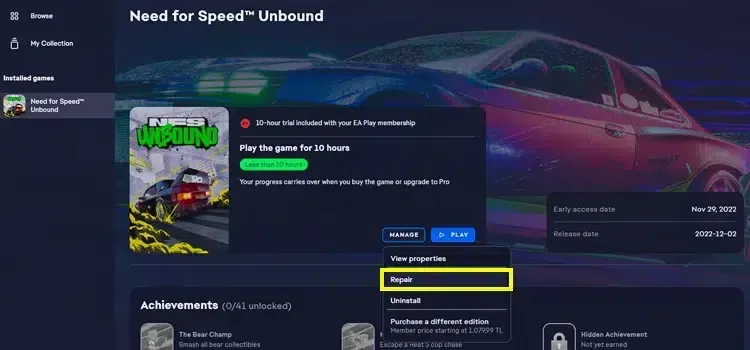
If Need for Speed's newest game is shutting down on the Unbound loading screen, the first thing you need to do is to verify the files. Since the game files may be damaged, the game can be closed before you reach the main menu. From which platform you downloaded the game, you can verify the game files from the library there. Completing this process will vary depending on the hardware on your computer and, if necessary, your internet speed.
delete pcdx12 file
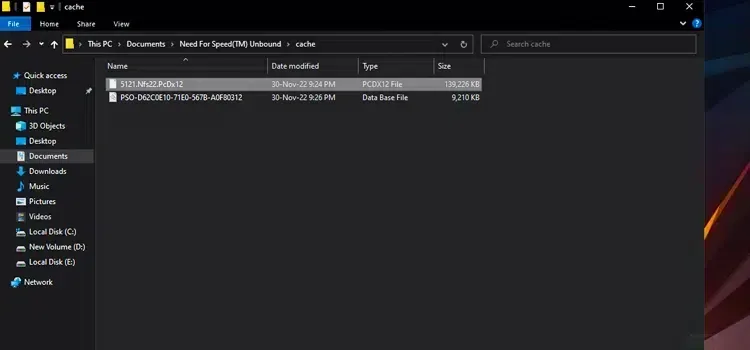
The suggestion to delete the PCDX12 file made by a player in the EA forum solves this problem. To find the pcdx12 file, follow the file path "My Documents > Need for Speed(TM) Unbound > Cache". After entering the cache folder, completely delete the file named " 5121.nfs22.pcdx12 " at the top. Then run the game as administrator.
You May Also Like: How to Fix the Black Screen in Hogwarts Legacy
Update video card driver
Try installing the latest video card driver. The most recent versions of video card drivers are made compatible with new games that have been released. Therefore, download and install all updates so far. If you wish, you can completely remove the driver of your video card from your computer and make a clean installation by using the DDU (Display Driver Uninstaller) program.
Refresh your computer
You have tried all the methods above, but the game is still not opening yet? The computer you use NFS Unbound System Requirements may not be sufficient. The best thing you can do in this case is to buy a new computer with up-to-date hardware. Thus, you can play not only this game but also other games without any problems.
we hope nfs unbound opening problem The solution methods we suggested have solved this problem. If you want, you can let us know whether the above solution suggestions are working or not in the comments section.