
 Add as a preferred source

Developed by Electronic Arts, FIFA 23 is among the most played football games in our country and all over the world. Quality gameplay and graphics are among the reasons why the players prefer FIFA 23. Although the game is stable FIFA 23 won't open There are also players who say. FIFA 23 not opening problem Solution suggestions will help you eliminate the problem.
FIFA 23 Not Opening Problem Solution Methods
When FIFA 23 first came out, some players had to take a break from the game due to some problems. We can say that the updates to the game corrected most of the critical errors in the game. After these updates, most players can play the game much better. However, after downloading FIFA 23 updates, for some reason FIFA 23 Won't Open Problem Living players can try the following solution methods.
Verify game files
The source of problems in FIFA 23 and all other games is usually due to the corruption in game files. There are more problems, especially in games that are updated very often. While downloading updates, games may not open because missing or corrupt files are loaded due to an unstable internet connection. To prevent this, you can verify the game files immediately after the updates.
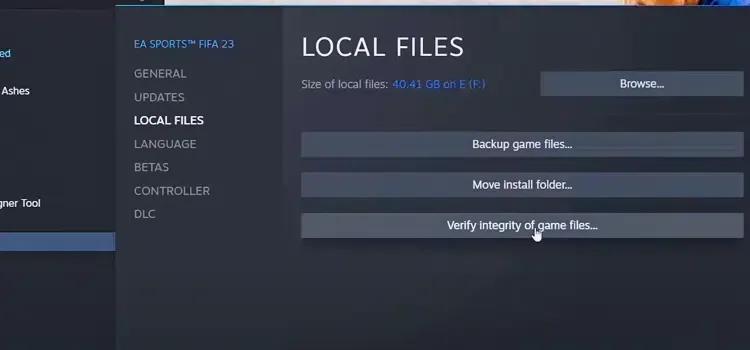
Verify FIFA 23 game files Open the Steam library. Find FIFA 23 here and right-click and open the Properties window. Click the Verify Game Integrity button from local files and wait for the process to complete. The file verification time varies depending on the size of the missing files, your internet speed and your computer hardware.
Run as administrator
In some games, opening problems may occur because the necessary permissions are not given. Such a thing may also apply to FIFA 23. First, close all Steam and EA applications running in the background. Then right-click on the EA app and open the Properties section. Here, switch to the Compatibility tab and click the Run as administrator box. Do the same for the EXE of the game. When you run as administrator FIFA 23 not opening problem can be solved.
Install video card updates complete
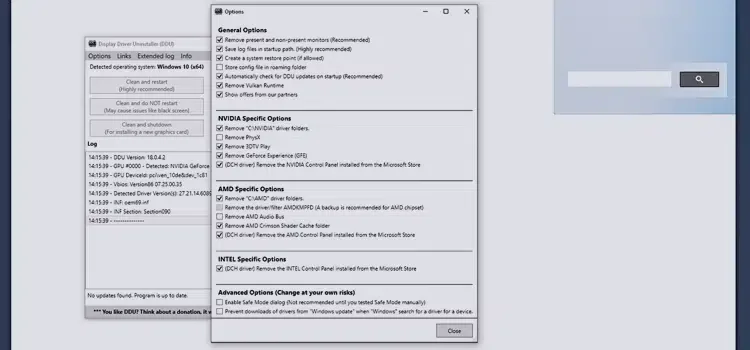
FIFA 23 won't open The best thing you can try is to update your video card drivers. Whether you use NVIDIA or AMD graphics card, always try to keep the drivers up to date. You can overcome software problems by installing the latest drivers. If you have never updated the video card from the day you bought it, first remove the video card driver from your computer with the DDU (Display Driver Uninstaller) program. Then download the latest video card driver and do a clean install.
You May Also Like: How to Fix Keyboard Keys That Are Not Working
Delete the game and reinstall it
You can try to install the game from scratch to solve the problems you encounter in games. A clean install from scratch will often come in handy. Remove the game completely from your computer through the platform you downloaded the game to. After restarting your computer and making sure you have a stable internet connection, download the game again and complete the installation.
You can get a new computer
FIFA 23 not opening problem If you have tried everything we suggested and you could not run the game because your computer is very old, it is time to buy a new computer. On computers with up-to-date hardware, you can play games much more smoothly. We recommend you to buy a new generation computer not only for FIFA 23, but also for good graphics and stable playing other games.
FIFA 23 Not Opening Problem Solution We have shared with you what you can do. We hope that the solution methods we have described will be useful to you. If you have a place where you are stuck or if you have a question, you can contact us in the comments section. Error Solutions You can reach the solution suggestions we have prepared for the problems of other games in the category.