
 Add as a preferred source
Destiny 2 Lightfall has new and gripping missions. Players fight with their friends to complete the tasks given by the contracts. Some of the players playing the paid DLC package Destiny 2 Lightfall crash problem reported that he had met. If you are experiencing this problem, you can solve this problem thanks to the suggestions in our content.
How to fix Destiny 2 Lightfall crash problem?

Destiny 2 is played by a lot of players and publishers from the moment Lightfall is released. Destiny 2 can be played completely free of charge. However, if you want to play the Lightfall DLC, you have to pay 449.00 TL. You can play new tasks with this DLC pack. Although there are not many problems in the game Destiny 2 Lightfall crash problem There can be living players. If the game crashes at the most exciting moment of the mission, you can try the following methods.
Run as administrator
To take advantage of the features in many games, you need to run them as administrators. Thus, you can give the necessary permissions to the game. To run the game as an administrator, enter the folder where Destiny 2 is installed. Right-click on Destiny2.exe in this folder and open the Properties window. Then click the Run as administrator box from the compatibility section and press the Apply button to close all windows and start the game.
Repair corrupt game files
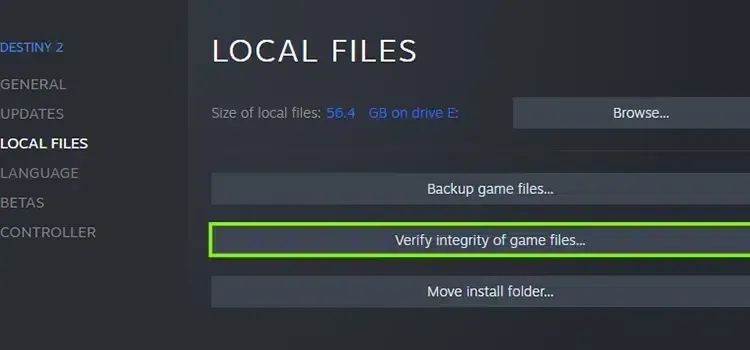
Destiny 2 Lightfall Crash Problem One of the best things you can do is to verify the files. At the end of this process, you will replace the corrupted files and the files properly. So the problem will be solved. In the Steam library, right-click the game and open the Properties window. Click the Local Files tab and press the Verify File Integrity button. We recommend that you do nothing until the process is completed.
You May Also Like: How to Fix NBA 2K23 Not Detecting a Gamepad
Make a clean install
If you've tried everything and didn't get a result, completely uninstall the game. Then start downloading the game at a time when your internet connection is stable. Since you have installed the game from scratch, all your settings will be gone. Don't forget to make all your game settings before starting the contracts.
Destiny 2 Lightfall crash problem These are what you can do for. We hope that you can continue from where you left off before your game crashes. If you are getting low FPS while playing the game Destiny 2 Lightfall FPS Boost You can get a fluent gaming experience by reviewing the recommendations in our guide.