
 Add as a preferred source
Those who want to play games with high FPS will love the Lossless Scaling application. This app, which has been on Steam since 2018, is constantly being developed to provide players with a more fluid experience. well, What is Lossless Scaling? How to use this app? Here is the answer to all the questions!
What is Lossless Scaling? What does it do?
Lossless Scaling, Improving the game experience of the players Frame Generation It is a program that enables the use of technology in all graphics cards. Players who cannot afford to buy an expensive gaming computer can play games fluently thanks to this application.
This program on the Steam platform is very famous for the players.download fps"We can say that Meme is embodied. The application was first added to Steam in 2018 and has received many updates since the day it was added.
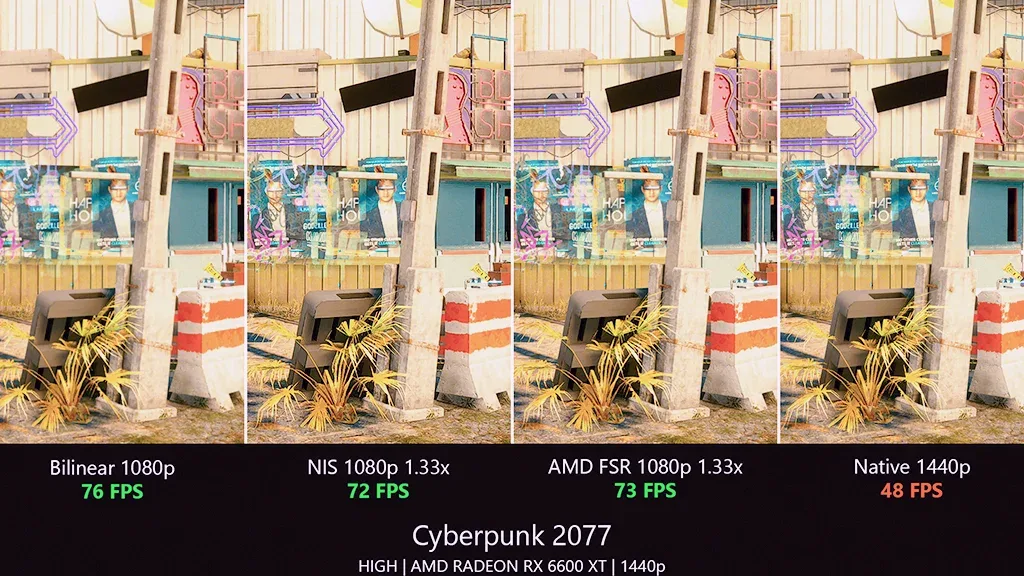
The program, which is constantly updated, includes various settings where players can get the most optimized performance. Players who activate these settings according to their graphics cards can play games at higher FPS values. well, How to use Lossless Scaling?
How to use Lossless Scaling?
First of all, we would like to point out that using this program is quite simple. After running the program, you can make special settings for the game you will play. To customize the game,
- First enter the game you want to play and then run the program.
- your program lower left on the side of "addClick the " button.
- Type the name of the game in the title and repeat "addClick the " button.
- Select the game name you typed from the left menu.
- Then from the scaling type menu, as the developer suggests "AMD FSR"Select.
- Set the sharpness to 8 or 9. We also do not recommend turning on the lightened mode. Because it can cause distortion in the image.
- The square creation setting on the right side of the program lsfg 2.1 choose.
- Finally at the top right"on scaleClick the button and switch to the game within 5 seconds.
When you follow these processes in order, the program will run smoothly. However, we want to make an important reminder. Game for Lossless Scaling to run properly Framed Window You have to open it in mode.
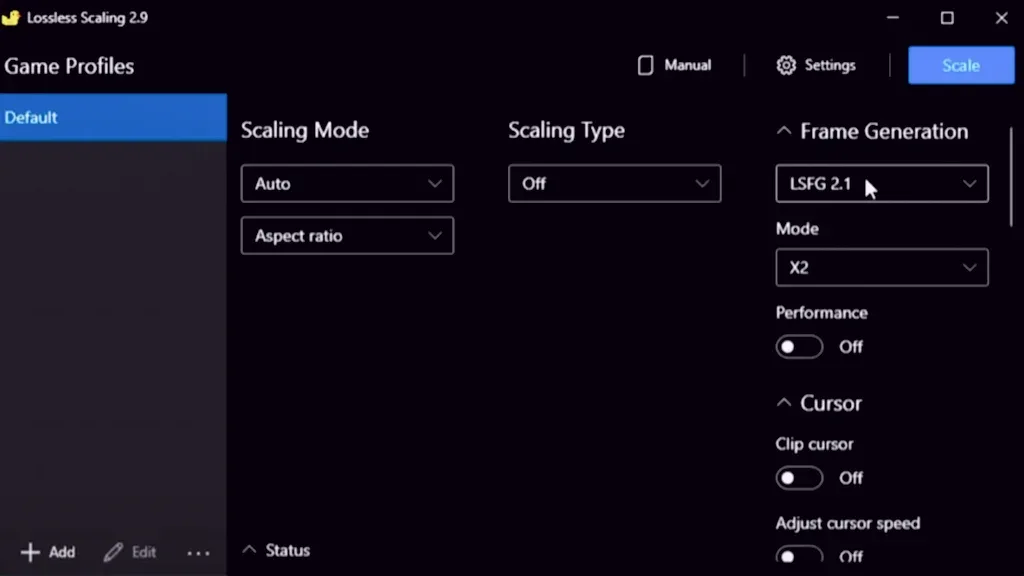
The program provides a noticeable increase in FPS but may cause aging. Of course, the developer has also considered this and added a setting to minimize delays.
You May Also Like: Why Was the Nokia 3310 So Popular?
You may be interested: Games that support AMD FSR
Before clicking the Scale buttonAllow TearsDelays are significantly reduced by enabling the setting ". By enabling this setting, especially in poorly optimized MMORPGs, high FPS values are also minimized.
Lossless Scaling FPS reduces problem solution
If you are experiencing FPS losses while playing games with the Lossless Scaling program, you may have made a mistake somewhere. To fix this problem, completely uninstall the program from your computer and reinstall it. Then enter the game by applying the settings I gave above. Thus, the problem will be solved and the FPS value will increase.
Lossless Scaling Ban?
No, the program is not a reason for ban as it does not interfere with game files in any way. It can be used easily in all online games with low FPS.
Lossless Scaling Price
Looking at the Steam page of the program, it is seen that the price is 3.50 USD. However, while we were preparing this content, there was a discount and the price had dropped by 2.80 USD.
Does Lossless Scaling really work?
At first, like everyone else, we were worried about whether it really worked. However, after using the program, we saw that it worked successfully in games. We can say that it works better on games that support AMD FSR in particular.
Result
In this article, it officially allows FPS downloads. Lossless Scaling We gave answers to the questions about the program. He thinks that players who do not have enough budget to collect new generation computers will like this program. Do you think this program provides enough FPS in games? You can specify your answers in the comments section.