FM 2024 FLUT Skin Pack
This content was independently prepared by the Oyuncu Konseyi editorial team. Sponsored and partnership content is always clearly labeled. Details: Editorial Standards
Indispensable for Football Manager players FM 2024 Flut Theme Pack It makes the game much more fun with regular updates and improvements. With the design and colors of the flut theme, you can easily perform many operations in the game. Moreover, even if you play for a long time, it does not tire your eyes. flute theme What makes the package so popular is that it constantly improves itself. In this content Football Manager 2024 Flut Theme We will share with you what we know about it.
What is FM 2024 Flut Theme Pack?
Flut theme package, as the name suggests, was prepared by a Football Manager player named Flut. He will be able to offer a better gaming experience to the players with the experiences he has gained by playing the game for many years. FM 2024 Theme Pack is preparing. When we look at the FM 2024 Flut theme package, the first thing that caught our attention is that the menus and texts are easily readable. This allows players to easily find what they are looking for.
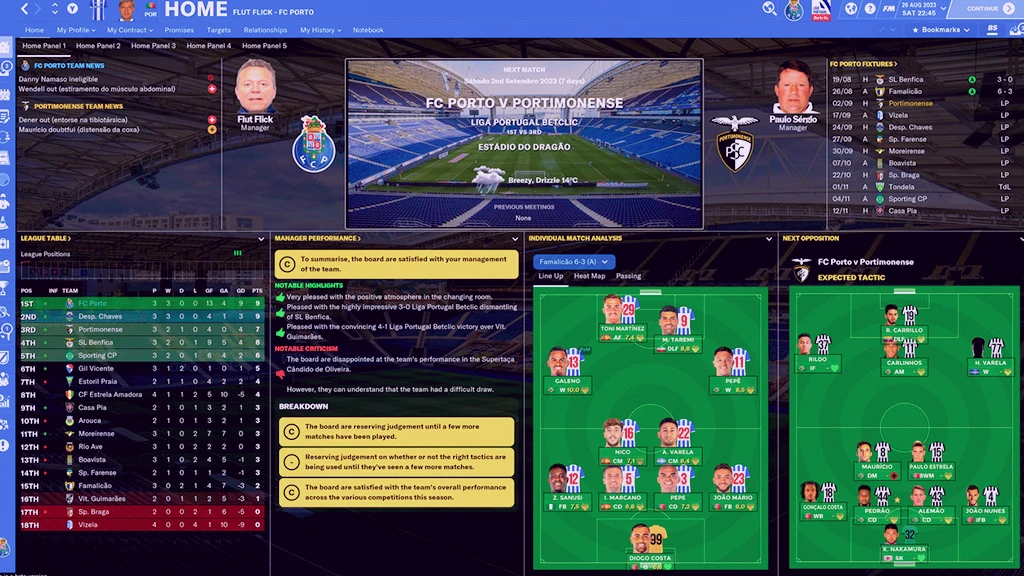
This theme package can be used in harmony with 4K resolution. However, in order to use it in 4K resolution, you need to play the game with 200% Display Settings in windowed mode. It can also be used in full screen mode at 1920 x 1080 resolution. You can choose one of these two resolution settings to view the panels in the theme package without any problems. You may not be able to view it properly in other resolutions.
Football Manager 24 Flut Theme Pack Installation
To install the Flut theme package developed for the Football Manager 2024 game, it will be enough to follow the steps below in order.
- Firstly Download FM 24 Flut Theme Pack Download the theme package to your computer by clicking on the link.
- in the compressed file you downloaded to your computerfm2024flutskin_darkDrag the file named ” into “My Documents\Sports Interactive\Football Manager 2024\Skins”. If there is no folder named Skins, you can create it yourself.
- Launch Football Manager 2024 and “preferencesSwitch to the ” screen and then to the Interface tab.
- In the interface tab “FM 2024 Flut Skin – 2.0You need to see the theme. Select and apply it.
After completing all the steps FM 2024 Flut Theme Pack will be installed without any problems. If you are having trouble installing the theme package or if you are wondering about different topics, you can contact us in the comments section. More Game Guides For their content, you can browse the relevant category.