
 Add as a preferred source
Overwatch 2 was released the other day. While most players can play the game without problems, some have had to fight with FPS problems and stuttering. we prepared Overwatch 2 FPS Boost Methods You can play the game quite fluently without falling behind from the competition. Since the settings we will give in our guide will be aimed directly at FPS, it can reduce the graphic quality.
Overwatch 2 FPS Boost Methods
As soon as the Overwatch 2 was released, the players who wanted to log in to the game encountered a long queue. It was clear that this would be so because the majority of the player base had already stopped playing Overwatch and was waiting for Overwatch 2. What interests the players is Overwatch 2 innovations happened. In order to avoid any glitches or critical problems on the servers, the players were played in rows. The players who entered the game started to play their first match, but there were those who fell out of the game due to the server or problems caused by them. In addition, players who are experiencing instant FPS losses and constantly getting stuck are also found in this process. Here Overwatch 2 FPS Boost Methods,
Overwatch 2 graphics settings
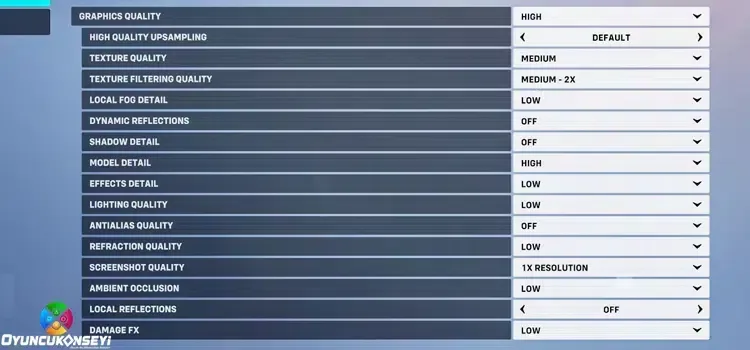
If you want to get the highest FPS value in the game, you must configure the game graphics settings correctly. Especially by changing the settings such as Render Scale, Anti-Aliasing and Shadow Quality Overwatch 2 Low FPS Problem You can eliminate annoying situations such as In addition, you should reduce the Reflection and Effects Quality settings in order not to tire your FPS and video card too much. If you are using a low VRAM graphics card, we recommend that you apply the following settings.
- Render Scale: 90-100
- High quality upsampling: default
- Texture quality: Medium or High
- Texture Filtering Quality: Medium- 2x or High-4x
- Local Fog Detail: Medium or Low
- Dynamic Reflections: off
- Shadow Detail: off
- Model Detail: high
- Effects Detail: low
- Lighting quality: low
- Antialias Quality: Low - FXAA or Medium Smaa Low
- Refraction quality: low
- Screenshot quality: 1x resolution
- Ambient occlusion: low
- Local Reflections: off
- DAMAGE FX: low
It is the render scale that significantly increases the FPS value you will receive among the Overwatch 2 FPS increase methods. No matter how much you increase this setting, the FPS value you will receive will decrease, but the game will look much clearer. As you lower the render scale value, you can achieve serious FPS gain, but the quality and clarity of the image will deteriorate. If your video card is an old model, we recommend you to reduce it to 90.
You May Also Like: God of War Route Boss Guide
Update drivers
Overwatch 2 FPS Boost Another point we want to mention in its guide is the drivers. Driver updates seem to be trivial to most players, but they cause FPS drops in games. By updating the drivers in your computer hardware, you will fix the errors in the previous version. Thus, you can both solve the sudden shutdown problems in the games and have a fluent game experience. In particular, you should update your video card driver frequently. Do not forget to update as the updates to the video card drivers focus the video card to give better performance.
Windows Power Options
Another reason why players get low FPS or get stuck in games from time to time is that they don't use the right power plan. If you have not made any changes since the day you installed Windows, your computer is running in balanced power mode. In this case, your processor will work with full performance when necessary. However, when you set the Windows Power Plan to High Performing, the processor will always work with full performance, which will help you play games with better FPS. After playing the game, you can switch to balanced power mode again in order not to tire your processor too much.
Overwatch 2 FPS Boost The settings in the guide are for a computer with entry-level hardware. If you have a slightly better computer, you can increase the Antialias Quality, Shadow Detail and Ambient Occlusion settings one by one level and play fluently with better graphics. We think the guide we prepared is useful. After making these settings, do not forget to specify how many fps you receive in the comments section. We wish you a lot of contests...