
 Add as a preferred source
Hogwarts Legacy The players are divided into two. While some players can play the game comfortably, some players encounter FPS problems. we prepared Hogwarts Legacy FPS Boost Guide recommendations, instant FPS drops and teasing solves problems. However, the FPS value you will earn will vary according to the hardware of your computer.
Hogwarts Legacy FPS Boost
Having met with great interest, Hogwarts Legacy seems to have been a bit inadequate in optimization. Some of the players who have up-to-date computer hardware may encounter FPS problems, especially in intermediate transitions. Small changes will help you play the game fluently. Here Hogwarts Legacy FPS Boosting Methods:
Adjust in-game graphics settings
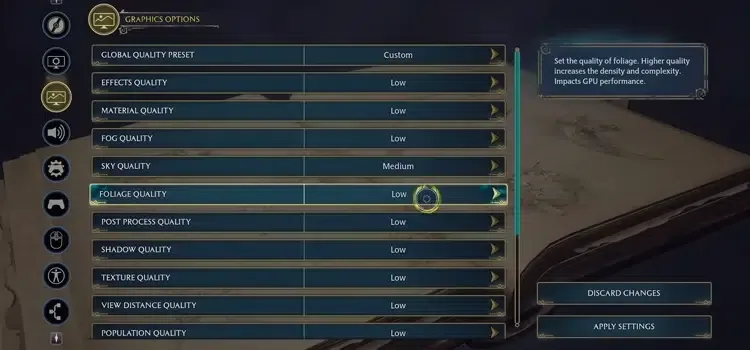
Players who overdo the game and cannot play because of this will get more FPS when they change their in-game graphics settings. The increase in FPS varies according to the hardware features of the computer. Lowering the graphics settings will make the game more fluid, even if it degrades the quality of some textures.
- Upscale Type: Nvidia DLSS or AMD FSR 2
- Upscale Mode: Nvidia DLSS Auto or AMD FSR 2 Quality Mode
- Frame Generation: ON (if it supports)
- Nvidia Reflex Low Latency: ON (if it supports)
- vsync: off
- Framerate: uncapped
- Effects Quality: medium
- Material quality: high
- FOG QUALITY: medium
- Sky Quality: medium
- Foliage Quality: medium
- Post Process Quality: high
- Shadow Quality: low
- Texture quality: Medium or High (depending on your video card.)
- View Distance Quality: medium
- Population Quality: Low or Medium
- Ray Tracing Reflections: off
- Ray Tracing Shadows: off
- Ray Tracing Ambient Occlusion: off
Configure video card settings correctly
Hogwarts Legacy FPS increase In our guide, it's time for the video card settings. Players using the most up-to-date drivers of the video card cannot get full performance when they do not make any adjustments. After entering the control panel of your video card, select the power management mode as maximum performance. In addition, determine the texture quality as performance. So Hogwarts Legacy FPS Drop Problem will be solved.
You May Also Like: Best Discord Custom Status Ideas
Change the priority assignment
If you use programs to listen to music or talk to your friends while playing the game, it will distribute the processor power. The main focus of the processor Hogwarts Legacy In order for it to happen, you need to make a small adjustment in the task manager. Scroll to the Task Manager's Details tab and right-click on the Hogwarts Legacy EXE and go to Set Priority. Select high or real-time from the small menu that opens. Now your processor will give priority to the game.
Verify Hogwarts Legacy game files
It is possible that there are some connection problems because the game is new and too many players suddenly start downloading the game. The fact that the files you downloaded due to the connection problem are missing or incorrect will also directly affect the performance in the game. Make sure you have a stable internet connection before verifying game files.
Hogwarts Legacy FPS Boost We have completed the methods. After applying our suggestions, you can play the game more fluently. Before starting the game Hogwarts Legacy Turkish Patch You can play the game in Turkish by installing the package.