
 Add as a preferred source
Developed by SCS Software, Euro Truck Simulator 2 has a good player base, although it debuted 10 years ago. Regular updates and expanded maps brought the game much better. Although it is a very old game, some players are still facing ETS 2 low FPS problem. we have prepared for you Euro Turck Simulator 2 FPS Boost You can play the game much more fluently with the guide.
Euro Truck Simulator 2 FPS Boost Methods
Playing games at high FPS values always offers a much better gaming experience. Especially in this type of car simulation games, the environment and vehicle details are very important. Although the ETS 2 release date is 2012, it is almost impossible for most players to play the game at high settings. If you are playing the game on TruckersMP servers as multiplayer Euro Truck Simulator 2 FPS Boost We recommend that you apply the settings we recommend in our guide.
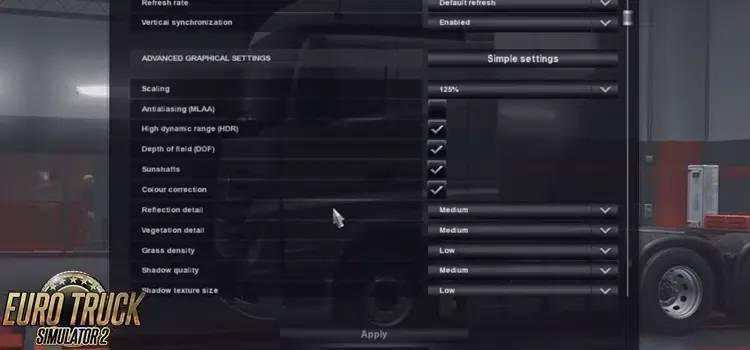
We have listed below ETS 2 FPS Boost Methods With this, you can get high FPS without much lowering the image quality in the game too much. Of course, this will vary depending on the hardware on your computer. If you have 3-4 generation old hardware, you can play the game fluently, even if you cannot reach very high FPS values.
ETS 2 Performance-oriented graphics settings
Among the Euro Truck Simulator 2 FPS boosting methods, we will share the settings that will give you the most FPS value. If your system is close to new generation hardware, you can also select the setting above these settings. In order to make the following settings, you need to open the graphics in the settings section in the menu and open the advanced settings. Then you can make changes in order.
- Scaling: Use between 125% - 200%. As you increase this value, you lose FPS.
- antialiasing Definitely remove the tick.
- High Dynamic Range click the box.
- Depth of Field Remove the tick.
- sunshafts Remove the tick.
- Color Correction Click the box next to it.
- Reflection Details: Low - Medium (If you have an old generation graphics card, do low.)
- Vegetation Details: low
- Grass Density: low
- Shadow Quality: Low - Medium
- Shadow Texture Size: low
- Weather Quality: Medium - High
- Mirror Quality: medium
- Mirror Resolution: medium
- mirror distance: low
- Texture quality: High (You can set this setting to Medium or Low according to your computer's hardware.)
- Anisotropic Filtering: Open 2 units from the left.
- normal maps Click the box next to it.
Euro Truck Simulator 2 FPS Boost That's what we're going to tell you about. We hope that after applying these settings, you can have a much more fluent gaming experience. If you wish, you can send us the FPS values you have obtained after trying these settings in the comments section. Also after making these settings ets 2 car mods We would like to point out that you can get more FPS after installing high-dimensional mod packages such as
You May Also Like: Graveyard Keeper Taverna Guide