
 Add as a preferred source
On the digital game platform Steam, eye-catching profiles can be created. The first step in creating an impressive Steam profile is to choose a cool profile picture. In this guide we will tell change steam profile picture You can easily change your avatar with steps.
if "How to change Steam Avatar?If you are wondering the answer to the question "The following steps will help you. You can change the avatar you will use in your Steam profile by taking only 2-3 minutes. Let's take the steps without further ado!
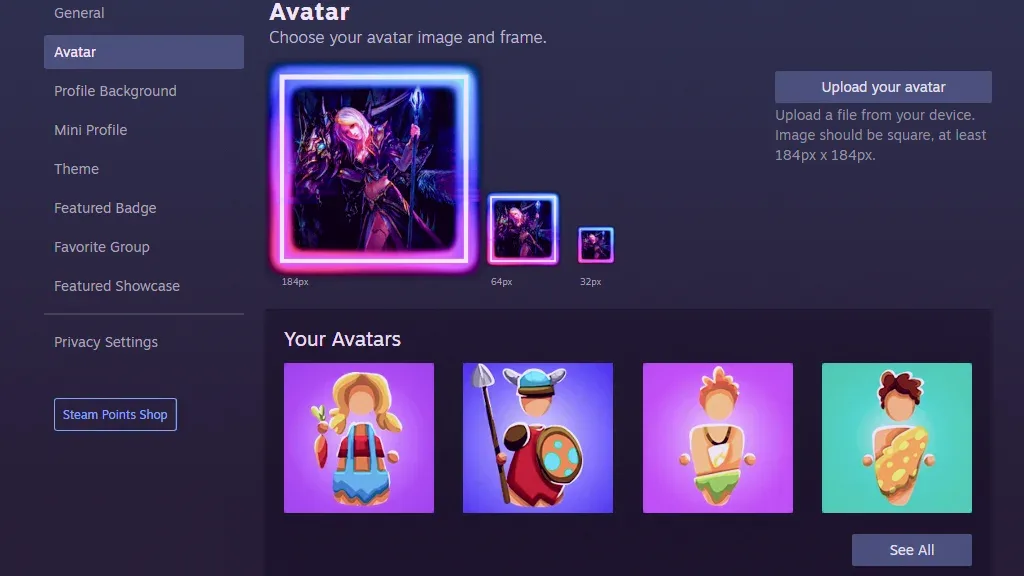
Steam Profile Photo Change Steps
- First, run the Steam client from desktop as administrator.
- Login to your Steam account with your membership information.
- Steam client top right Click on your username in the corner.
- Inside the small window"View My ProfileClick ".
- To change the Steam profile picture, at the top right of the profile screenEdit My ProfileClick the " button.
- From the left menu of the screen that opensavatarEnter the " tab.
- Then "Install your avatar"You can make one of the photos on your computer by clicking the " button. You can also choose from the avatars you get from Steam games.
steam profile picture change problem solution
In some cases, users Steam profile picture change problem can meet. The main reason for encountering this problem is that the size of the photo is too large.
You May Also Like: How to Make Your X (Twitter) Account Private: Protect Your Posts
Dimensions of profile photo to use on Steam At least 184 x 184 pixels MUST BE. You should make sure that the file size of the photo is not too high. In addition to these, we would like to remind you that you need to upload a photo with the JPEG extension.
Result
In this article change steam profile picture We are here with your steps. We think that the content we have prepared is beneficial for you. What image are you using on your Steam profile? You can share it with us in the comments section. Also if you want to know how much your Steam account is playerkonseyi.com/steam-account-value-how-learn/ You can click the link.